검증된 Decanter 패키지는 7.5.3이며 Tailwind CSS ^3.4.17을 명시합니다. 공개 진입점은 Tailwind 구성 프리셋입니다. presets에 require("decanter")를 추가하고, content가 실제 소스 파일을 가리키도록 설정한 다음 유틸리티 스타일시트를 컴파일하세요. 가져와서 사용할 Decanter React 제공자는 없습니다.
문서에는 곧 v8에서 제거될 항목이 포함되어 있지만, 설치 경로는 여전히 v7로 안내합니다. 이 참고 자료는 v7.5.3으로 고정하고, 사용 중단 예정인 foggy, slab 및 이전 modular-text 유틸리티는 사용하지 않습니다. 독립형 미리보기는 레이아웃 규칙을 해석한 결과물임을 분명히 밝히며, Tailwind로 컴파일했다고 주장하지 않습니다.
주요 산세리프 및 세리프 글꼴은 Source Sans 3과 Source Serif 4이며, 대체 글꼴로 Helvetica/Arial과 Georgia/Times를 사용합니다. type-* 유틸리티는 고정된 픽셀 크기의 제목이 아니라 비례에 따른 역할을 정의합니다. 글자 크기 배율은 모바일에서 1.15, 태블릿에서 1.2, 데스크톱에서 1.25입니다.
예제에서는 문서에 안내된 basefont-23 설정을 선택합니다. XS–SM에서는 18px, MD–XL에서는 21px, 2XL에서는 23px입니다. 좁은 임베디드 예제에서도 화면 비율이 적절하도록 제목에는 type-3 크기를 적용합니다. 다른 기준 크기를 선택한 프로젝트에서는 이 미리보기의 픽셀 값을 복사하지 말고 결과 크기를 다시 계산해야 합니다.
cc 컨테이너는 화면 크기에 맞춰 엄선된 가장자리 여백을 적용합니다. XS에서 20px, SM에서 30px, MD에서 50px, LG에서 80px, XL에서 100px입니다. 뷰포트가 1700px에 도달하면 콘텐츠 최대 너비인 1500px까지 확장됩니다. 이는 고정된 1200px 컨테이너가 아니라 가장자리 규칙이 명시된 유동형 시스템입니다.
예제는 해당 가장자리 여백을 따르며 MD 미만에서는 편집 카드 두 개를 한 열로 배치합니다. 카드 콘텐츠는 일반적인 문서 순서를 사용하므로 레이아웃이 한 열로 바뀌어도 키보드 탐색 순서는 읽는 순서와 같습니다.
Decanter은 반응형 여백과 패딩을 위한 rs-m-* 및 rs-p-* 계열을 제공합니다. 선택한 단계는 문서화된 범위에 따라 달라지며, Tailwind의 고정 간격 별칭이 아닙니다. 예제 코드에서는 카드 주위에 rs-p-1을 사용하고 액션 영역에는 일반 고정 패딩을 적용합니다.
참고 자료의 재현성을 위해 독립형 해석본에서는 CSS에 적용한 모든 변경 사항을 애플리케이션 코드로 명시합니다. 네이티브 빌드에서는 같은 이름으로 별도의 충돌 규칙을 정의하는 대신 프리셋이 생성한 유틸리티를 사용하세요. 빌드 스캐너가 전체 클래스를 감지하지 못하는 경우 "rs-p-" + size와 같은 동적 조합은 피하세요.
Stanford의 기본 카디널 레드는 #8c1515입니다. 디지털 레드 #b1040e는 상호작용과 강조에 사용하며, 대학 아이덴티티의 카디널 레드를 대체하지 않습니다. 디지털 블루 #006cb8은 링크에, 더 어두운 상호작용 상태에는 #00548f을 사용합니다.
이 예시에서는 펼쳐 보기 동작에 디지털 레드를 사용하고, 절제된 중립 배경을 적용했습니다. Stanford 워드마크, 인장 또는 공식 아이덴티티 바는 포함하지 않습니다. 기관에서 배포할 경우 승인된 아이덴티티 자산과 대학 브랜드 규정을 사용해야 합니다. 기술 참고 자료가 공식 승인을 의미하지는 않습니다.
공식 카드 예시는 의미 구조를 갖춘 HTML이며, 여백·서체·배경·동작을 위한 유틸리티를 제공합니다. 이 구성에서는 행사 주제를 제목과 구분하고, 날짜와 장소를 텍스트로 표시하며, 실제 버튼을 눌러 초록을 제자리에서 펼쳐 보입니다. 존재하지 않는 Decanter Card 속성을 만들어내지 않습니다 API.
이동이 실제 동작이라면 제목에 링크를 적용하는 것이 적절합니다. 여기서는 내용이 현재 화면에서 펼쳐지므로 aria-expanded와 aria-controls가 적용된 버튼으로 동작을 전달합니다. 미리보기에는 대학 뉴스를 복사하는 대신 독창적인 행사명과 초록을 사용합니다.
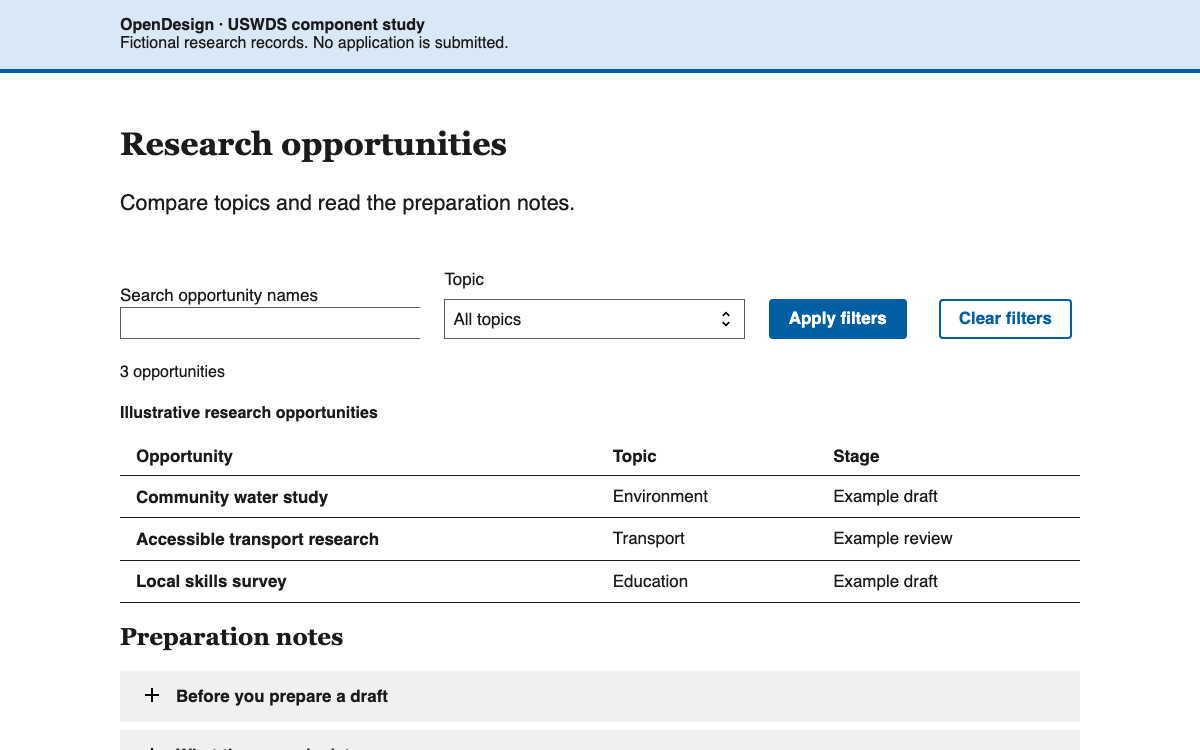
주제 선택기는 독창적인 연구 행사 카드 두 개를 필터링하고, 화면에 표시되는 결과 수를 업데이트합니다. 결과가 없는 선택지는 빈 상태와 초기화 경로를 보여주기 위한 것입니다. 필터는 제목 계층 구조를 변경하거나 카드를 선택 가능한 양식 옵션으로 바꾸지 않습니다.
각 초록에는 개별 버튼 상태가 있습니다. 카드를 닫아도 포커스는 같은 트리거에 유지됩니다. 필터를 변경하면 숨겨진 초록을 닫으므로 주제로 돌아왔을 때 일관된 개요 상태로 시작할 수 있습니다. 이 컨트롤은 유틸리티 기반 디자인 접근 방식에 더한 애플리케이션 동작이며, 패키지에 포함된 Decanter JavaScript이 아닙니다.
제공된 설정은 Tailwind 3과 검증된 Decanter 7.5.3 프리셋을 대상으로 합니다. 입력 지시문, 콘텐츠 glob, 출력 명령과 독창적인 카드 구성을 포함합니다. 생성된 스타일시트를 문서 head에 연결하세요. 승인된 글꼴 파일을 별도로 불러오거나, 문서에 명시된 대체 글꼴을 그대로 사용하세요.
이 미리보기는 해당 도구 체인으로 빌드되지 않았으며, 구현 설명에 그 사실을 명시합니다. 실제 제품에 적용할 때는 전체 클래스 집합을 직접 컴파일하고 생성된 결과를 확인하세요. 특히 메이저 버전 업그레이드로 사용 중단 예정 유틸리티가 바뀌는 경우에는 더욱 주의해야 합니다.
Decanter와 호환되는 Tailwind 메이저 버전을 고정하세요.
프리셋을 등록하고 실제 소스 디렉터리를 스캔 대상으로 지정하세요.
Tailwind 지시문 세 레이어를 컴파일하세요.
문서에 명시된 브레이크포인트에서 선택한 기본 글꼴, 화면 가장자리와 카드 동작을 확인하세요.
전체 문서에 레이아웃, 컨트롤 및 초기화가 포함되어 있습니다. 링크된 예시 아카이브의 압축을 풀면 정확한 상대 경로의 벤더 에셋을 얻을 수 있습니다. 그런 다음 HTTP로 제공하세요.
html
<!doctype html><html lang="en"><meta charset="utf-8"><meta name="viewport" content="width=device-width,initial-scale=1"><title>Decanter editorial composition</title><style>*{box-sizing:border-box}body{margin:0;background:#f6f5f2;color:#2e2d29;font:18px/1.5 'Helvetica Neue',Helvetica,Arial,sans-serif}.cc{margin-inline:20px;max-width:1500px;padding-block:40px}h1{font-family:Georgia,serif;font-size:1.520875em;line-height:1.2;margin:24px 0}h2{font:700 1.3225em/1.25 Georgia,serif;margin:12px 0}p{margin:16px 0}.overline{letter-spacing:.12em;font-size:14px;font-weight:700}.filters{display:flex;gap:16px;align-items:center;flex-wrap:wrap;padding-block:24px;border-block:1px solid #c0c0bf;margin-block:32px}select{font:inherit;background:white;border:1px solid #767674;padding:8px}.cards{display:grid;grid-template-columns:1fr;gap:20px}article{background:white;padding:24px;border-top:4px solid #8c1515}article time{font-size:16px;color:#53565a}.topic{font-size:14px;font-weight:600;letter-spacing:.04em}.abstract{border-top:1px solid #d5d5d4;padding-top:16px}.action{font:600 16px/1.3 Arial,sans-serif;background:#b1040e;color:white;border:0;padding:12px 20px;cursor:pointer}.action:hover{background:#820000;text-decoration:underline}.reset{font:inherit;color:#006cb8;background:none;border:0;text-decoration:underline;padding:8px 0;cursor:pointer}:focus-visible{outline:3px solid #00548f;outline-offset:4px}small{display:block;font-size:14px;color:#53565a;margin-top:32px}[hidden]{display:none!important}@media(min-width:576px){.cc{margin-inline:30px}}@media(min-width:768px){body{font-size:21px}.cc{margin-inline:50px}h1{font-size:1.728em}h2{font-size:1.44em}.cards{grid-template-columns:repeat(2,minmax(0,1fr))}}@media(min-width:992px){.cc{margin-inline:80px}.cards{gap:36px}h1{font-size:1.953125em}h2{font-size:1.5625em}}@media(min-width:1200px){.cc{margin-inline:100px}.cards{gap:40px}}@media(min-width:1500px){body{font-size:23px}.cards{gap:48px}}@media(min-width:1700px){.cc{margin-inline:auto}}
</style><main class="cc"><p class="overline">RESEARCH CONVERSATIONS · ORIGINAL EXAMPLES</p><h1>Ideas take shape in conversation.</h1><p>A compact editorial collection interpreting Decanter’s responsive type and screen-edge rules.</p><div class="filters"><label for="topic">Topic</label><select id="topic"><option value="all">All topics</option><option value="environment">Environment</option><option value="archives">Archives</option><option value="astronomy">Astronomy</option></select><span id="count" role="status">2 example events</span></div><div class="cards"><article data-topic="environment"><p class="topic">ENVIRONMENT</p><h2>Reading the changing coast</h2><time datetime="2026-10-12">12 October · Fictional seminar room</time><p>How field notes reveal changes that a single measurement cannot capture.</p><button class="action" type="button" aria-expanded="false" aria-controls="coast">Show session details</button><div class="abstract" id="coast" hidden><p>This original sample session compares written observations, sketches and repeat measurements. The conversation asks how researchers describe uncertainty when a landscape changes gradually.</p></div></article><article data-topic="archives"><p class="topic">ARCHIVES</p><h2>The stories between records</h2><time datetime="2026-10-19">19 October · Fictional reading room</time><p>Exploring how context connects objects in a community archive.</p><button class="action" type="button" aria-expanded="false" aria-controls="archive">Show session details</button><div class="abstract" id="archive" hidden><p>This original example considers correspondence, oral history and catalogue descriptions together. It examines how a collection can preserve disagreement without erasing individual perspectives.</p></div></article></div><div id="empty" hidden><h2>No events in this example topic</h2><p>Choose another topic or return to the full collection.</p><button type="button" class="reset" id="reset">Show all topics</button></div><small>Independent OpenDesign specimen. Original content, local font fallbacks and interpreted Decanter layout rules. No Stanford identity or real event listing.</small></main><script>const topic=document.querySelector('#topic'),cards=[...document.querySelectorAll('article')];function filter(){let count=0;cards.forEach(c=>{c.hidden=topic.value!=='all'&&topic.value!==c.dataset.topic;if(!c.hidden)count++;const b=c.querySelector('button');b.setAttribute('aria-expanded','false');b.textContent='Show session details';c.querySelector('.abstract').hidden=true});document.querySelector('#count').textContent=count+' example events';document.querySelector('#empty').hidden=count!==0}topic.onchange=filter;document.querySelector('#reset').onclick=()=>{topic.value='all';filter();topic.focus()};document.querySelectorAll('.action').forEach(b=>b.onclick=()=>{let open=b.getAttribute('aria-expanded')!=='true';b.setAttribute('aria-expanded',String(open));b.textContent=open?'Hide session details':'Show session details';document.getElementById(b.getAttribute('aria-controls')).hidden=!open});</script></html>
Sources에서 완전한 예시를 다운로드하세요. README에 정확한 로컬 실행 명령이 안내되어 있습니다.
벤더 경로는 이 문서에 대한 상대 경로로 유지하세요. 아카이브에는 이 미리보기에 사용된 에셋이 모두 포함되어 있습니다.
04
Decanter 디자인 시스템 에이전트 설정
구현 시작점
소스를 검증한 프리셋 빌드 진입점이며, 해석 기반 독립형 미리보기에서는 실행되지 않았습니다. dist/styles.css를 문서 head에 연결하세요. 글꼴과 기관 아이덴티티 자산은 별도로 결정해야 합니다. Sources의 완전한 작동 예제 ZIP에는 미리보기에 필요한 정확한 종속 항목과 전체 문서도 포함되어 있습니다. ZIP을 압축 해제하고 해당 디렉터리에서 python3 -m http.server 8080을 실행한 다음 http://localhost:8080/stanford-decanter.html을 여세요. 모듈 기반 예제를 file://로 열지 마세요.
Decanter 7.5.3/Tailwind 3을 사용해 에디토리얼 형식의 행사 페이지를 구성하세요. 프리셋, 명시적인 basefont 선택, type-* 크기 체계와 cc 화면 가장자리 유틸리티를 사용하세요. 의미 구조를 갖춘 카드에서 주제, 제목, 시간, 장소를 서로 구분하세요. 페이지 내 주제 필터링과 aria-expanded를 사용하는 초록 펼치기 컨트롤을 구현하세요. 사용 중단 예정인 foggy/slab 유틸리티, 대학 스토리의 복사본, 아이덴티티 표식은 사용하지 마세요. 수동으로 해석한 미리보기는 컴파일된 Decanter 빌드와 구분해 표시하세요.
05
Decanter 디자인 시스템 출처 및 범위
공식 대학 행사 페이지가 아닌 독립적인 OpenDesign 교육용 구성입니다. 콘텐츠는 독창적이며 Stanford 표식은 사용하지 않았습니다. 코드 적용과 브랜드 승인을 받은 아이덴티티 사용은 별개의 사안입니다.