DSFR는 프랑스 국가 디자인 시스템입니다. 현재 공식 사용 조건에서는 .gouv.fr 서비스와 국가 모바일 애플리케이션을 적용 대상으로 명시하며, 국가 기관 사용자 및 운영자와 외부 조직을 구분합니다. 이는 로고를 숨긴다고 없앨 수 있는 각주가 아니라 실질적인 도입 범위의 경계입니다.
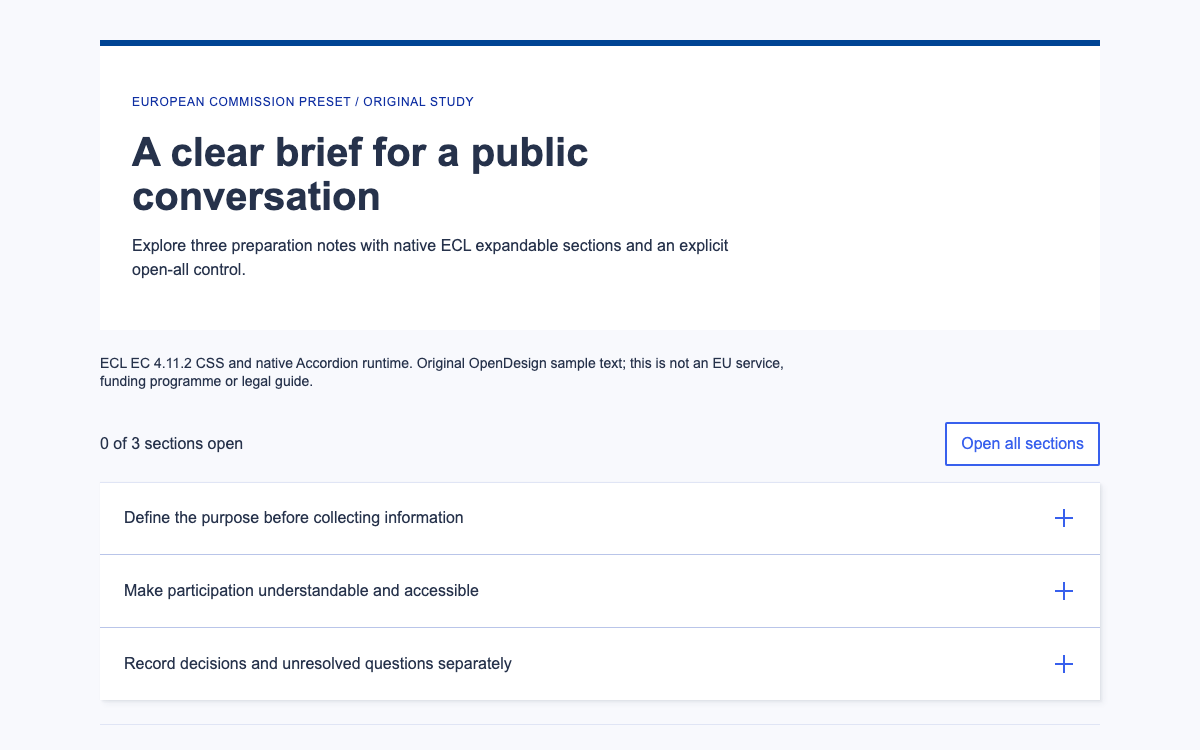
적용 대상 팀은 공식 프로젝트 승인 및 구현 절차를 따라야 합니다. 관련 없는 제품이라도 문서화된 정보 아키텍처와 접근성 관련 원칙을 참고할 수 있지만, 프랑스 국가 아이덴티티를 사용하는 것처럼 보여서는 안 됩니다. 이 페이지의 미리보기는 독창적인 중립 아코디언 예제로, DSFR 스타일, 글꼴 또는 스크립트를 불러오지 않습니다.
타이포그래피 문서에는 Marianne과 Spectral이 명시되어 있으며, 각각 Arial과 Georgia를 대체 글꼴로 사용합니다. 기본 본문 텍스트는 16px/24px이고, 아티클 텍스트는 18px/28px입니다. H1은 모바일에서 32px/40px, 데스크톱에서 40px/48px로 바뀝니다. 이 값은 공식 시스템을 설명하며, 데모에서는 자체적인 중립 타이포그래피를 사용합니다.
텍스트 크기 클래스는 의미에 맞는 제목 수준을 대신하지 않습니다. 페이지 제목은 h1로 유지하고 각 아코디언 제목에는 적절한 제목 수준을 지정하세요. 시각적으로 더 큰 스타일을 사용해 문서 구조를 건너뛰어서는 안 됩니다.
그리드 기준에는 SM 576px, MD 768px, LG 992px, XL 1248px가 정의되어 있습니다. 콘텐츠 최대 너비는 가장 큰 기준에서 1200px입니다. 선택 사항인 거터는 작은 화면에서 16px, LG부터 24px입니다. 코드 그리드는 기본적으로 거터가 없으므로 Figma 그리드를 마크업으로 옮길 때 유의해야 합니다.
간격은 4px의 배수를 기준으로 하며, −6px, −2px, 2px, 6px는 예외로 문서화되어 있습니다. 따라서 간격 클래스는 임의의 오프셋을 만들어도 된다는 뜻이 아니라, 통제된 체계에 따른 값입니다. 중립 미리보기는 별도의 단일 읽기 열을 사용하며 공식 그리드를 재현한다고 주장하지 않습니다.
문서화된 컴포넌트는 section.fr-accordion, heading.fr-accordion__title, button.fr-accordion__btn, 그리고 그 뒤에 오는 div.fr-collapse로 구성됩니다. 버튼의 aria-controls는 패널 id와 일치해야 하며, aria-expanded는 패널의 열림 상태를 나타냅니다. 제목 수준은 페이지의 주변 구조에 맞춰야 합니다.
패널에는 문단이나 목록처럼 올바른 텍스트 요소를 사용합니다. 기본 DSFR JavaScript가 확장 클래스를 관리하므로, 적격 프로젝트에서는 컴포넌트와 충돌하는 별도의 클릭 핸들러를 추가하지 않아야 합니다. 중립 미리보기는 학습 목적으로 자체적인 열림/닫힘 상태를 명시적으로 구현합니다.
기본적으로 fr-accordions-group은 연결 방식으로 동작합니다. 한 항목을 열면 열려 있던 다른 항목이 닫힙니다. data-fr-group="false"로 설정하면 여러 패널을 동시에 열어 둘 수 있습니다. 예제에서는 두 방식을 모두 보여 주어 상호 참조가 필요한 정보에 미치는 영향을 비교할 수 있습니다.
이 차이는 준비 안내에서 중요합니다. 문서 목록을 확인하는 사람은 주소 패널도 함께 열어 두어야 할 수 있습니다. 한 번에 하나만 여는 그룹은 공간을 절약하지만, 맥락을 반복해서 숨깁니다. 기본값을 편집 원칙처럼 취급하지 말고 작업에 맞는 방식을 선택하세요.
접근성 페이지에서는 런타임 기본값보다 한 걸음 더 나아가, 연결 그룹이 사용성 문제를 일으킬 수 있으므로 기본적으로 독립형 그룹을 권장합니다. 따라서 예제는 독립형 모드로 시작합니다.
각 중립 미리보기 트리거는 실제 버튼이므로 Enter와 Space 키로 브라우저의 버튼 동작을 실행할 수 있습니다. 스크립트는 aria-expanded와 제어되는 패널의 hidden 상태를 모두 변경합니다. 패널이 닫혀도 트리거를 제거하지 않으며, 활성화된 버튼에 포커스를 유지합니다.
모드 선택기를 사용하면 독립형과 연결형 동작을 바로 비교할 수 있습니다. 화면에 표시되는 작은 상태 안내에는 열린 패널이 나열됩니다. 이는 예제의 학습 보조 기능이며 공식 DSFR 컴포넌트는 아닙니다. 좁은 화면에서는 제목이 줄바꿈되고 버튼 영역은 전체 너비를 유지합니다.
공식 접근성 페이지에는 어두운 테마에서 호버 대비가 충분하지 않은 문제와 특정 스크린 리더/브라우저의 안내 제한도 문서화되어 있습니다. 컴포넌트를 수정 없이 사용한다고 해서 접근성이 완벽하다고 판단하지 마세요. 배포할 버전과 환경에서 알려진 제한 사항을 검토하세요.
공식 코드 페이지에는 코어 및 아코디언 CSS 종속성과 코어 및 아코디언 모듈 스크립트가 나와 있습니다. 이를 불러오면 런타임이 문서화된 마크업을 자동으로 향상합니다. 공개 API를 사용하면 초기화 후 dsfr(element).collapse.disclose()를 호출해 패널을 펼칠 수 있습니다.
제공된 설치 항목은 적격 기관 프로젝트용입니다. 소스를 확인했지만 중립 미리보기에서는 실행하지 않았으며, 미리보기에는 DSFR 런타임 종속성이 의도적으로 포함되어 있지 않습니다. 프로덕션 팀은 업그레이드 시 공식 에셋 디렉터리 구조, 컴포넌트 마크업, 최신 사용 조건을 함께 유지해야 합니다.
전체 문서에 레이아웃, 컨트롤 및 초기화가 포함되어 있습니다. 링크된 예시 아카이브의 압축을 풀면 정확한 상대 경로의 벤더 에셋을 얻을 수 있습니다. 그런 다음 HTTP로 제공하세요.
html
<!doctype html><html lang="en"><meta charset="utf-8"><meta name="viewport" content="width=device-width,initial-scale=1"><title>Accordion structure laboratory</title><style>*{box-sizing:border-box}body{margin:0;font:16px/1.6 Arial,sans-serif;color:#28251f;background:#faf9f6}main{max-width:54rem;margin:auto;padding:32px 24px}.notice{background:#eee9df;border-left:4px solid #6b573d;padding:16px}h1{font:700 32px/1.3 Georgia,serif;margin:24px 0}h2{font-size:18px;margin:0}.mode{display:flex;gap:12px;align-items:center;flex-wrap:wrap;margin:24px 0}select{font:inherit;padding:10px;background:white;border:1px solid #777}section{border-bottom:1px solid #aaa18f}.trigger{font:700 18px/1.5 Arial,sans-serif;border:0;background:transparent;color:inherit;display:flex;justify-content:space-between;gap:16px;text-align:start;padding:20px 8px;width:100%;cursor:pointer}.trigger::after{content:'+'}.trigger[aria-expanded=true]::after{content:'−'}.panel{padding:0 24px 24px}.panel p{margin-top:0}:focus-visible{outline:3px solid #6b573d;outline-offset:3px}#state{font-size:14px;background:#eee9df;padding:12px;margin-top:24px}small{display:block;margin-top:24px;color:#625a4e;font-size:14px}[hidden]{display:none!important}@media(max-width:600px){main{padding:24px 16px}h1{font-size:28px}.panel{padding-inline:8px}}</style><main><div class="notice">Neutral interaction study · No DSFR visual identity or assets</div><h1>Prepare for a community workshop</h1><p>The purpose and main instruction stay visible: arrive with your booking note. Optional supporting details can be opened below.</p><div class="mode"><label for="mode">Panel behaviour</label><select id="mode"><option value="independent">Independent: compare sections</option><option value="linked">Linked: one section at a time</option></select></div><div id="group"><section><h2><button type="button" class="trigger" aria-expanded="false" aria-controls="access">Room access</button></h2><div class="panel" id="access" hidden><p>The fictional workshop room is reached from the courtyard. The step-free entrance is on the same level as the activity room.</p><p>Ask the example welcome desk for assistance if the courtyard route is unavailable. These are demonstration instructions, not a real venue guide.</p></div></section><section><h2><button type="button" class="trigger" aria-expanded="false" aria-controls="equipment">Equipment to bring</button></h2><div class="panel" id="equipment" hidden><p>The example workshop uses simple paper materials. Bring the following if convenient:</p><ul><li>A notebook for your own observations.</li><li>A pencil or pen you can use comfortably.</li><li>Your fictional booking reference.</li></ul></div></section><section><h2><button type="button" class="trigger" aria-expanded="false" aria-controls="arrival">What happens on arrival</button></h2><div class="panel" id="arrival" hidden><p>The example facilitator explains the activity before participants choose a seat. No personal information is collected by this demonstration.</p><p>Keep this panel open with the equipment list to compare the two instructions in independent mode.</p></div></section></div><p id="state" role="status">Open sections: none</p><small>Original OpenDesign educational specimen. DSFR documentation informs the structural comparison; this is not a government service or native DSFR rendering.</small></main><script>const buttons=[...document.querySelectorAll('.trigger')],mode=document.querySelector('#mode');function set(b,open){b.setAttribute('aria-expanded',String(open));document.getElementById(b.getAttribute('aria-controls')).hidden=!open}function announce(){const names=buttons.filter(b=>b.getAttribute('aria-expanded')==='true').map(b=>b.textContent);document.querySelector('#state').textContent='Open sections: '+(names.join(', ')||'none')}buttons.forEach(b=>b.onclick=()=>{const open=b.getAttribute('aria-expanded')!=='true';if(open&&mode.value==='linked')buttons.forEach(x=>set(x,false));set(b,open);announce()});mode.onchange=()=>{if(mode.value==='linked'){let retained=false;buttons.forEach(b=>{if(b.getAttribute('aria-expanded')==='true'){if(retained)set(b,false);retained=true}})}announce()};</script></html>
Sources에서 완전한 예시를 다운로드하세요. README에 정확한 로컬 실행 명령이 안내되어 있습니다.
벤더 경로는 이 문서에 대한 상대 경로로 유지하세요. 아카이브에는 이 미리보기에 사용된 에셋이 모두 포함되어 있습니다.
04
DSFR 디자인 시스템 에이전트 설정
구현 시작점
소스를 확인한 적격 프로젝트용 설치 방법이며, 중립 미리보기에서는 실행하지 않습니다. 기관 프로젝트에 한정된 적용 범위와 최신 공식 약관을 준수하세요. dist 디렉터리를 복사해 종속 에셋의 상대 경로를 유지하세요. Sources의 전체 작업 예제 ZIP에는 미리보기의 정확한 종속성과 전체 문서도 포함되어 있습니다. 압축을 풀고 해당 디렉터리에서 python3 -m http.server 8080을 실행한 다음 http://localhost:8080/dsfr.html을 여세요. 모듈 기반 예제는 file://로 열지 마세요.
bash
# For a project within the documented DSFR institutional scope:
npm install @gouvfr/[email protected]
# Copy node_modules/@gouvfr/dsfr/dist to your public asset directory.
# In <head>:
# <link rel="stylesheet" href="/dsfr/core/core.min.css">
# <link rel="stylesheet" href="/dsfr/component/accordion/accordion.min.css">
# Before </body>:
# <script type="module" src="/dsfr/core/core.module.min.js"></script>
# <script type="module" src="/dsfr/component/accordion/accordion.module.min.js"></script>
프로젝트를 위한 프롬프트
에이전트 프롬프트
DSFR 아코디언의 구조와 적용 범위를 설명합니다. 사용 자격이 있는 국가 프로젝트에서는 fr-accordion, fr-accordion__title, fr-accordion__btn, fr-collapse를 사용하고, id와 aria-controls를 서로 일치시킵니다. core와 아코디언 에셋을 불러오고, 비교를 위해 여러 섹션을 열어 두어야 할 때는 data-fr-group=false를 설정합니다. 독립적인 교육용 미리보기에서는 독자적인 중립 스타일을 사용하고 구조적 해석임을 명확히 표시합니다. 국가 정체성 서체를 불러오거나 공식 서비스라고 주장하지 마세요.
05
DSFR 디자인 시스템의 출처와 적용 범위
DSFR에는 문서화된 기관별 사용 범위가 있습니다. 이 페이지는 기술 참고 자료이며, 자체 제작한 중립 미리보기는 프랑스 정부 서비스도, DSFR 브랜드를 적용한 구현도 아닙니다.