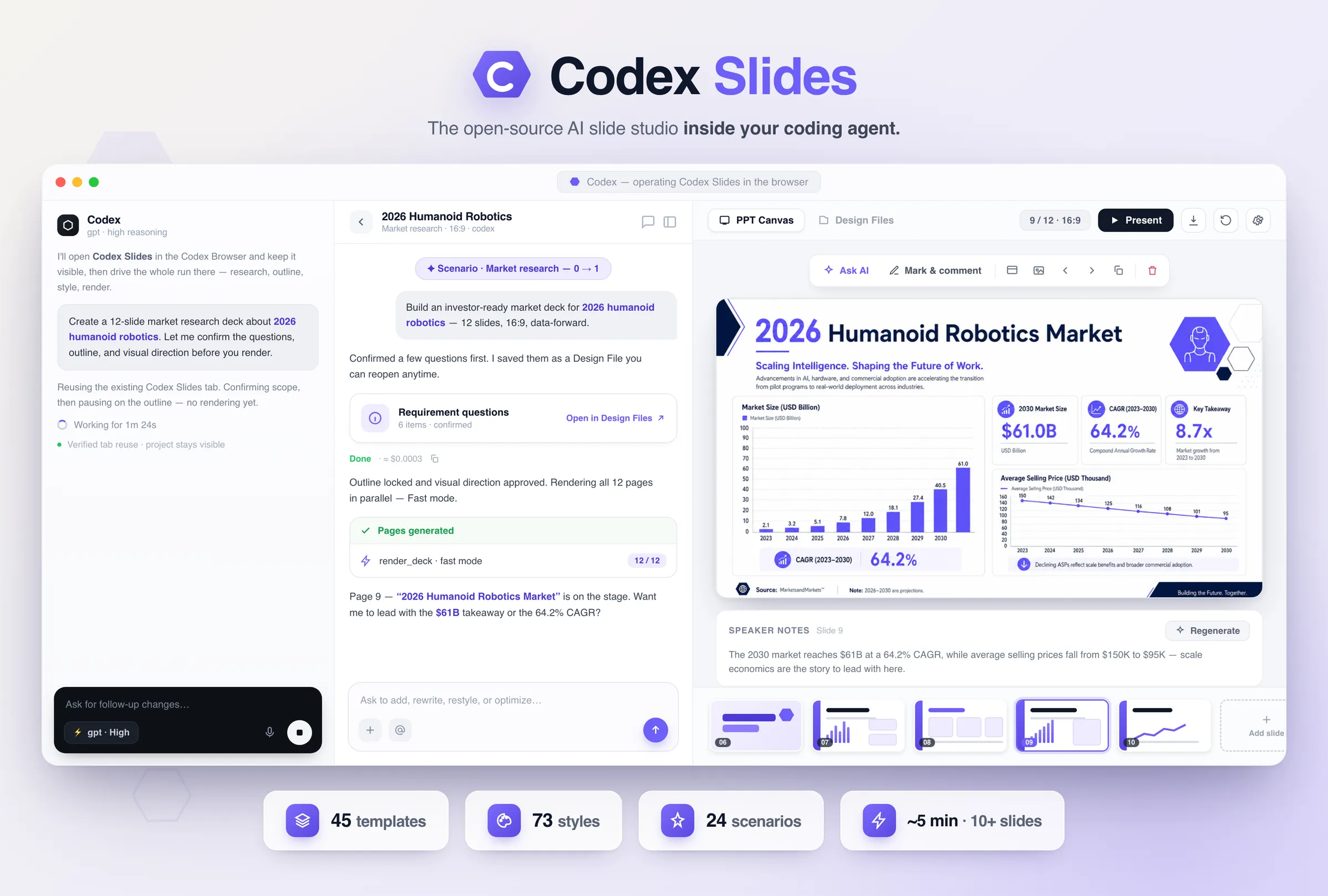
Codex Slides: The AI slide studio inside your coding agent.
Most AI slide generators hide the work behind one request and hand back a file. Codex Slides keeps the whole chain live inside Codex: research, outline, visual direction, render, edit, present, and export. Every deck stays a durable project on your own disk, and because it is image-native, each slide is a full visual canvas rather than a template with the text swapped out.
A deck is not a one-shot generation problem. It is a series of decisions about what to say, in what order, and in what visual language, and each one is cheaper to fix before the render than after it.
You watch it happen instead of waiting for a file.
Codex opens the studio in its Browser and keeps it visible. You confirm the brief, revise the outline, and approve the visual direction before a single page renders, so the expensive mistakes get caught while they are still cheap.
Every deck is a durable project, not a download.
Conversation, sources, outline, brand rules, checkpoints, and rendered pages all persist on disk. Come back tomorrow and keep editing the same project; every AI command and manual edit leaves an immutable checkpoint you can inspect, restore, or export.
Image-native: the slide is the canvas.
Each page is composed as one full visual canvas rather than a text box dropped on a theme, which is why the output holds up next to hand-designed decks. Mark up a slide directly and regenerate just that page from your annotations.
How it works
One prompt in, a presentation-ready deck out, with a checkpoint at every step where your judgment is worth more than another model call.
01
Clarify the brief
A tailored questions form confirms audience, page count, aspect ratio, language, resolution, and visual intent before any writing starts.
02
Research the facts
Optional multi-round web research produces a source-backed Markdown brief that stays inspectable and editable in Design Files.
03
Shape the outline
Edit every title and talking point, add or drop slides, reorder the story, or ask the agent to restructure it before the visuals exist.
04
Lock the visual direction
Codex Slides ranks its style library against your topic and outline. Pick one, search the full catalog, or keep the default.
05
Render in parallel
Fast mode fans every page out at once instead of one by one, so a 10-slide deck lands in about four to five minutes while the direction stays locked.
06
Edit in place
Ask for a rewrite, mark a region with arrows and comments, replace an image, reorder pages, set transitions, and write speaker notes.
07
Present and export
Run Presenter Mode with a synchronized audience window and timer, then download a real PPTX and a print-ready PDF with notes preserved.
What the decks look like
Every card is a visual system that ships with Codex Slides: a finished direction you can start from, then swap in your own topic, audience, or files.
Market report · charts & KPIs
Data story · dashboard
Keynote · cinematic
Editorial · print grid
Keynote · clean daylight
Technical · labeled cutaway
See the real product
These are the actual screens Codex drives in its Browser, the same ones you would use by hand, so you can step in and take over at any point.
Home · describe your deck
Scenarios · pick a workflow
Outline · shape the story
Editor · full canvas
Six workflow groups
Twenty-four guided scenarios, bundled into six workflow groups. Each group brings its own questions, source slots, and visual grammar. Start from one, or just describe what you need.
Create from scratch
Business reports, pitch decks, and project proposals from a single brief.
Transform a source
Beautify an existing PPTX, HTML, or PDF; turn documents, notes, or a whiteboard photo into slides.
Data & insights
Dashboards, recurring performance reports, financial results, and survey readouts.
Research & decisions
Deep research presentations, market studies, competitive analyses, literature reviews.
Optimize a deck
Apply a brand system, recreate a reference style, translate and localize, compress or expand.
Specialized outputs
Training courseware, launch keynotes, portfolios and case studies, template-driven batches.
Real files you can hand off
When the deck looks right, export a genuine PowerPoint (.pptx) and a print-ready PDF, both keeping your speaker notes. Choose the render quality and the shape that fits the room or the feed:
Export formats
PowerPoint (.pptx) · PDF · speaker notes kept
Render quality
1K · 2K · 4K
Aspect ratios
16:9 · 4:3 · 1:1 · 9:16 · 3:4
Fast and frictionless
Fast mode
Pages render in parallel, up to four at a time with the rest queued, instead of one after another, while the approved outline and visual direction stay locked. A ten-slide deck typically lands in about four to five minutes, and an interrupted run resumes from the saved project state rather than starting over.
Install in Codex
Add the repository as a plugin marketplace, install the plugin, restart Codex, and start a new task. You need Codex with plugin support, Node.js 20 or newer, and one `codex login`. No separate OpenAI key and no `.env` file for the default workflow.
OpenDesign is the open, local-first design workspace that sits outside the coding agent you already use. Codex Slides is that same idea aimed at presentations: your agent does the work in the open, the project stays on your machine, and nothing is locked behind a subscription. For the full design toolkit beyond slides, get the OpenDesign app.