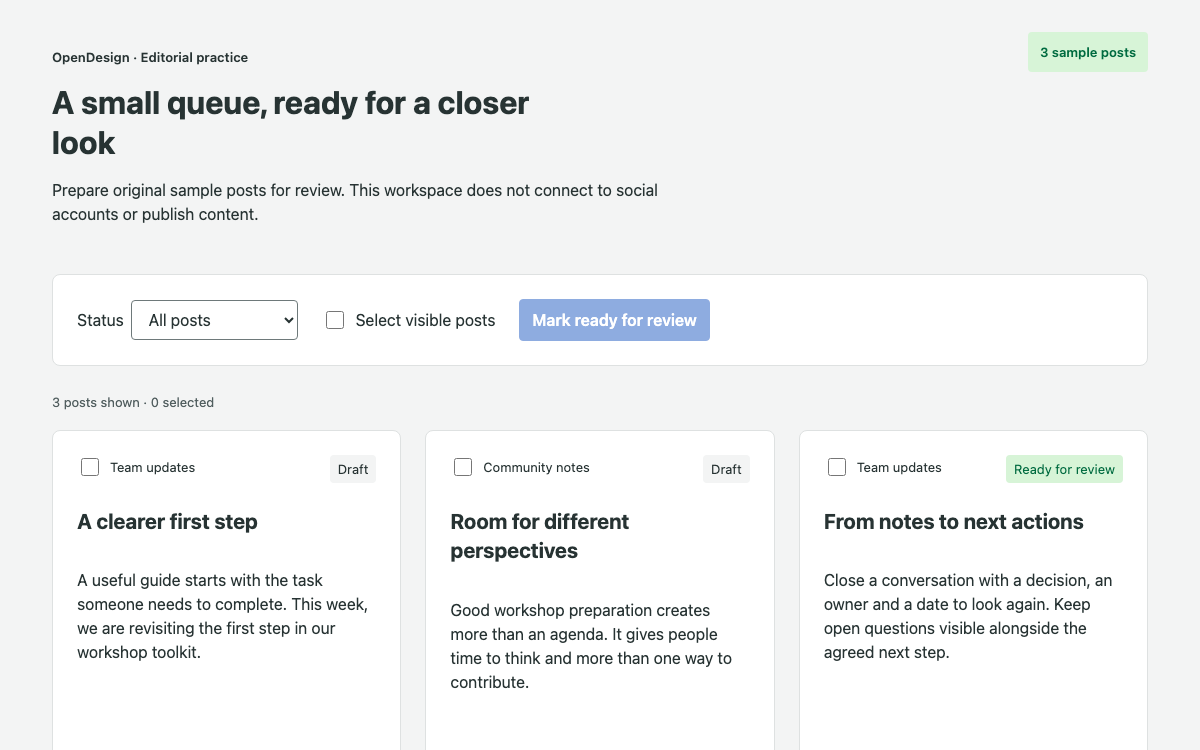
Explore Horizon Workspace’s exact spacing, radius and typography references through a complete local request-review flow with draft retention, validation, status filters and recovery.
Original HTML/CSS/JavaScript with local Cabin and Lato fonts; no ServiceNow platform connection. · Implementation reference
02
ServiceNow Horizon Design System Design Reference
Published Horizon Workspace spacing, corner-radius and typography references. Original application colors are intentionally excluded from this official reference table.
ServiceNow Horizon Design System Workspace and Implementation Scope
Start with the app framework
Horizon covers several ServiceNow app frameworks. This page focuses on Workspace: a queue and selected record stay visible together so a reviewer can move through local work without losing context. It does not present Service Portal, Native Mobile and Core UI as interchangeable skins. The live study is an original HTML application, not an embedded ServiceNow instance.
Separate verified foundations from original choices
The reference gives exact published spacing names, radius values and typography roles. The study’s green action color, neutral surfaces and focus blue are original OpenDesign values declared with an app prefix. They are not claimed to be official Horizon token exports. No invented ServiceNow package install or platform API is required to run the complete example.
ServiceNow Horizon Design System Workspace Spacing, Radius and Type
Use the actual spacing sequence
The documented scale is 2, 4, 8, 12, 16, 24, 32 and 40px. The study uses it to distinguish the gap between queue and record, the padding within a record and the smaller distances among metadata. Those values serve different grouping relationships even when the same step recurs. A uniformly padded screen would lose that hierarchy.
Give headings and reading text separate roles
Cabin is used for headings and Lato for body text, matching the published family roles. The study uses a 32px page heading on wider screens and a 24px record heading. Radius references are 2, 6 and 8px rather than an assumed generic 4/8/12 sequence. Rounded status labels do not communicate status by shape or color alone; they also contain the words Open or Reviewed.
ServiceNow Horizon Design System Queue, Selected Record and Filtering
Maintain one selected record
Each queue action names a practice request and displays its owner and status. Selecting it fills the adjacent detail and focuses the new heading. The selected action has aria-current and a visible border treatment. This is an original list/detail pattern rather than a native Horizon component API; its complete state logic is supplied for inspection.
Recover when a filter removes the selection
The status filter narrows the visible queue. If the selected request no longer belongs to it, the application selects the first available matching request. If none remain, it displays an empty message and a Show all requests action. The count uses the full three-record collection as the denominator. Filtering never deletes records or silently changes their status.
Keep the selected record inside the current filtered set.
Show a clear empty state when that set has no records.
Recover through Show all requests without deleting data.
ServiceNow Horizon Design System Draft Notes and Review Validation
Keep drafts attached to their record
The text area updates a draft on the corresponding record as the reviewer types. Moving to another request and returning preserves that draft. A blank or whitespace-only note cannot mark a request reviewed: an inline error appears, aria-invalid is set and focus returns to the text area. The data model keeps the saved note and current draft explicit.
Make the local state transition observable
ServiceNow Horizon Design System Reopening and Accessible Feedback
Retain useful work when reopening
Reopen request returns a reviewed record to Open while retaining its saved note. Under a Reviewed-only filter this can leave the list empty; the recovery action then restores the full queue. This combination tests the relationship among record state, filtering and selected detail, which is more revealing than checking each button in isolation.
Use text, focus and status together
Status colors are paired with text labels. Validation focuses the field that needs work, record navigation focuses the heading, and local updates use a status region. The study does not remove the need for testing with assistive technology in a production Workspace. It supplies a complete, inspectable local flow on which that testing can begin.
ServiceNow Horizon Design System Complete Local Source and Checks
Install the public font dependencies
The supplied entry imports public Cabin and Lato font packages and the original composition stylesheet. Its HTML shell supplies the root element. There is no ServiceNow runtime, credential or endpoint in this example. Actual platform integration should begin through Horizon’s Workspace and developer resources rather than treating the local record array as a ServiceNow API contract.
Install the public font dependencies in a vanilla app.
Save the complete entry, stylesheet and root HTML shell.
Test draft retention before saving a review.
Combine status filtering with reopening and empty-state recovery.
Check the connected workflow
Submit an empty note, enter a draft, visit another request and return to verify it survived. Mark the record reviewed, filter to Reviewed and reopen it. Check the empty-state recovery and retained note. At narrow widths, the queue stacks before the detail without dropping any action. Font loading, JavaScript errors and horizontal overflow are checked alongside these state changes.
ServiceNow Horizon Design System Component Examples
main.js — complete queue and review logic
All records, drafts, filters, validation and recovery.
javascript
import '@fontsource/cabin/latin-600.css';
import '@fontsource/lato/latin-400.css';
import '@fontsource/lato/latin-700.css';
import './horizon.css';
const records=[{id:'REQ-104',title:'Review the workshop outline',owner:'Design team',priority:'Normal',detail:'Compare the proposed agenda with the decision the team needs to make. Capture one question that should be resolved before the workshop.'},{id:'REQ-105',title:'Check the shared resource list',owner:'Content team',priority:'High',detail:'Review the resource titles for clear action language and confirm that each summary explains when the resource is useful.'},{id:'REQ-106',title:'Prepare the research readout',owner:'Research team',priority:'Normal',detail:'Group the observations by theme. Keep direct observations separate from the team’s interpretation and include the questions still open.'}].map(x=>({...x,status:'Open',note:''}));let selected=records[0].id;
document.querySelector('#root').innerHTML=`<main><header><p class="eyebrow">OpenDesign · Workflow study</p><h1>Team review workspace</h1><p>Review three original practice requests. Update a local record while keeping the queue and details in context.</p></header><div class="toolbar"><label>Status <select id="filter"><option>All</option><option>Open</option><option>Reviewed</option></select></label><p id="queue-count" role="status"></p></div><div class="workspace"><nav aria-label="Practice request queue"><div id="queue"></div><p id="empty" hidden>No requests match this status.</p><button id="clear" hidden>Show all requests</button></nav><section id="detail" aria-labelledby="record-title"></section></div><p id="feedback" role="status"></p><footer><strong>Original application, documented foundations.</strong> Cabin headings, Lato body text, the published 2–40px spacing scale and 2/6/8px radius references inform this study. The colors and application behavior are original OpenDesign choices. This is not the ServiceNow platform or a connected Workspace.</footer></main>`;
function renderQueue(){let filter=document.querySelector('#filter').value,visible=records.filter(x=>filter==='All'||x.status===filter);if(!visible.some(x=>x.id===selected))selected=visible[0]?.id;const queue=document.querySelector('#queue');queue.replaceChildren(...visible.map(r=>{let b=document.createElement('button');b.className='queue-item';b.dataset.id=r.id;b.setAttribute('aria-current',String(r.id===selected));b.innerHTML=`<span class="record-id">${r.id}</span><strong>${r.title}</strong><span>${r.owner}</span><span class="status ${r.status.toLowerCase()}">${r.status}</span>`;b.onclick=()=>{selected=r.id;renderQueue();renderDetail();document.querySelector('#record-title')?.focus()};return b}));document.querySelector('#queue-count').textContent=`${visible.length} of ${records.length} requests`;document.querySelector('#empty').hidden=visible.length>0;document.querySelector('#clear').hidden=visible.length>0;}
function renderDetail(){const r=records.find(x=>x.id===selected),panel=document.querySelector('#detail');if(!r){panel.innerHTML='<h2 id="record-title">Choose another status</h2><p>All local requests are still available through the status filter.</p>';return}panel.innerHTML=`<p class="eyebrow">${r.id} · ${r.owner}</p><h2 id="record-title" tabindex="-1">${r.title}</h2><p>${r.detail}</p><dl><div><dt>Priority</dt><dd>${r.priority}</dd></div><div><dt>Status</dt><dd>${r.status}</dd></div></dl><form id="review"><label for="note">Review note</label><p class="hint" id="hint">Write one useful observation. This note remains in the page.</p><textarea id="note" rows="4" aria-describedby="hint error"></textarea><p id="error" class="error" hidden>Enter a review note before marking this request reviewed.</p><div class="actions"><button type="submit" class="primary">${r.status==='Open'?'Mark reviewed':'Update review'}</button><button type="button" id="reopen" ${r.status==='Open'?'hidden':''}>Reopen request</button></div></form>`;const note=panel.querySelector('#note');note.value=r.draft??r.note;note.oninput=()=>{r.draft=note.value;document.querySelector('#error').hidden=true;note.removeAttribute('aria-invalid');document.querySelector('#feedback').textContent=''};panel.querySelector('#review').onsubmit=e=>{e.preventDefault();if(!note.value.trim()){document.querySelector('#error').hidden=false;note.setAttribute('aria-invalid','true');note.focus();return}r.note=note.value.trim();r.draft=r.note;r.status='Reviewed';renderQueue();renderDetail();document.querySelector('#feedback').textContent=r.id+' reviewed locally. No record was sent to ServiceNow.';document.querySelector('#record-title')?.focus();};panel.querySelector('#reopen').onclick=()=>{r.status='Open';renderQueue();renderDetail();document.querySelector('#feedback').textContent=r.id+' reopened. The saved review note is retained.';document.querySelector('#record-title')?.focus();};}
document.querySelector('#filter').onchange=()=>{renderQueue();renderDetail();document.querySelector('#feedback').textContent=''};document.querySelector('#clear').onclick=()=>{document.querySelector('#filter').value='All';renderQueue();renderDetail();document.querySelector('#filter').focus()};renderQueue();renderDetail();
This runs the original study only. Native ServiceNow implementation requires the appropriate platform development environment.
sh
npm create vite@latest horizon-study -- --template vanilla
cd horizon-study
npm install
npm install @fontsource/[email protected] @fontsource/[email protected]
# Save index.html at root; main.js and horizon.css in src.
npm run dev
A Prompt for Your Project
Agent Prompt
Build the complete original request-review study using the verified Horizon Workspace type, spacing and radius references. Keep original colors app-prefixed. Preserve per-record drafts, validate before review, recompute filtered selection after status changes, retain notes on reopening and provide empty recovery. Do not claim a live ServiceNow connection.
05
ServiceNow Horizon Design System Sources and Scope
An original OpenDesign HTML/CSS study informed by Horizon Workspace foundations. It uses documented Cabin/Lato typography and spacing/radius values, with original colors and workflow logic. It is not a ServiceNow instance or native Workspace runtime.