

Graphics
Employee Onboarding Guide Design
This Employee Onboarding Guide Design turns a new hire's first day, first week, and 30/60/90 milestones into a practical path with visible checkpoints.

Onboarding Guide Use Cases
- People Operations PlanningStructure onboarding information across schedules, milestones, resources, and readiness checks.
- New-Hire Experience DesignGive employees a concrete sequence for meeting people, tools, and expectations.
- Manager Check-In PlanningConnect early activities to review points at days 30, 60, and 90.
- Internal Guide DesignPresent illustrative workplace information in a document employees can scan.
Onboarding Plan Highlights
- Day-One ScheduleSeven timed activities connect setup, relationships, learning, and a first contribution.
- First-Week TimelineFive weekday cards each show two primary activities, with one Friday event marked optional.
- 30/60/90 MilestonesThree outcome cards turn onboarding into progressively larger responsibilities.
- Resources And ReadinessBookmarks sit beside a checklist of practical signs of preparation.
The Guide, Section by Section
1 / 6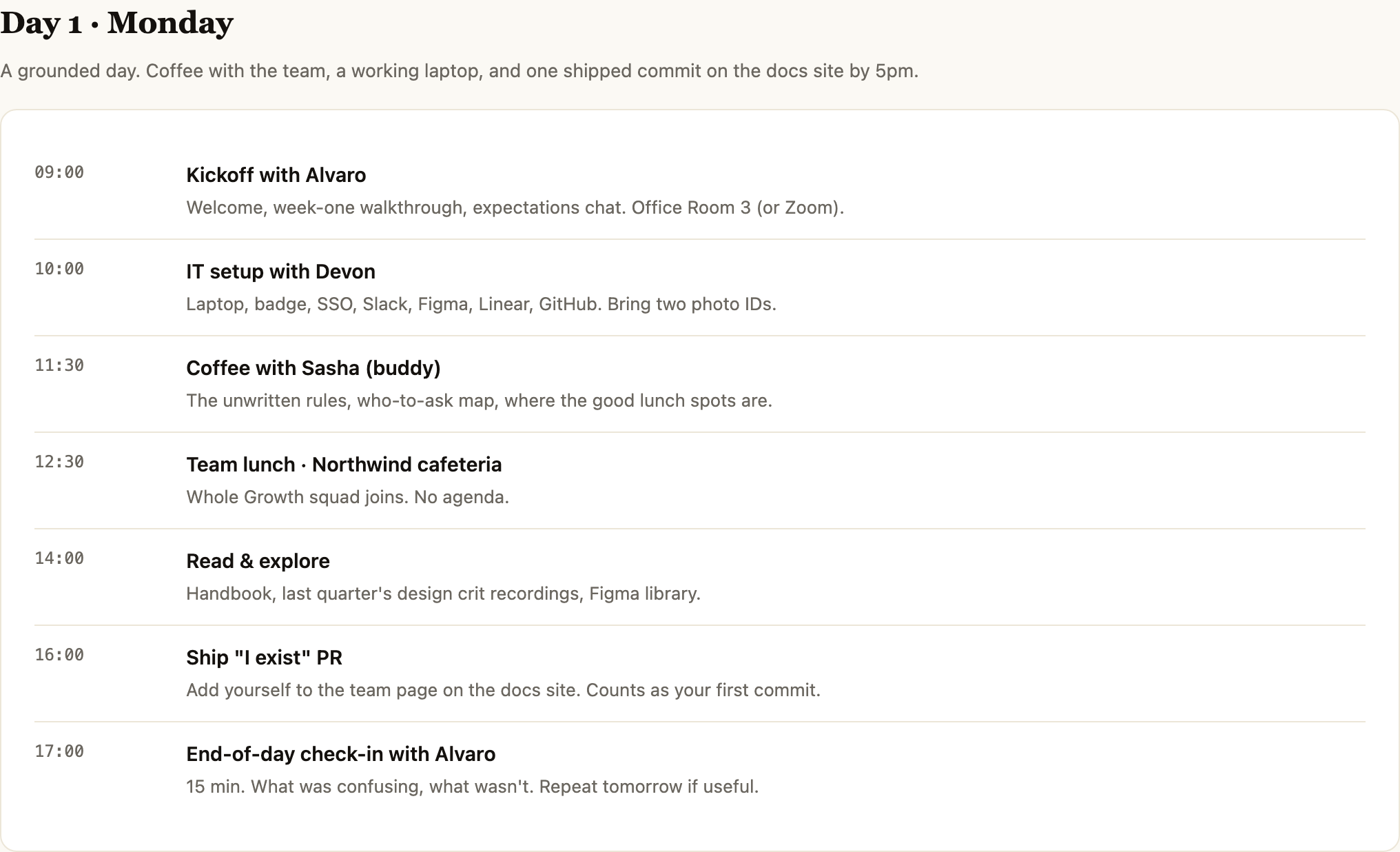
Employee Onboarding Guide Design
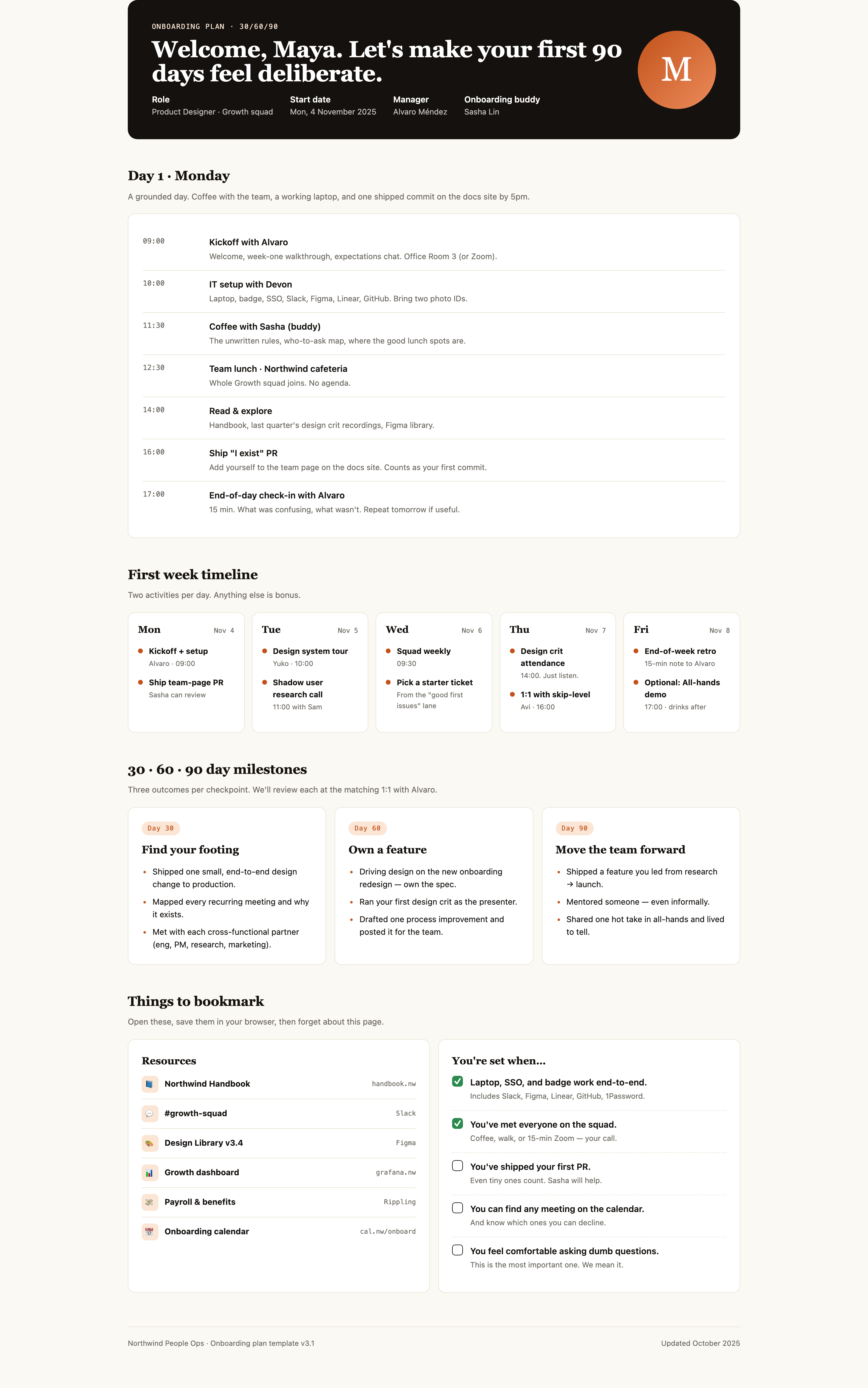
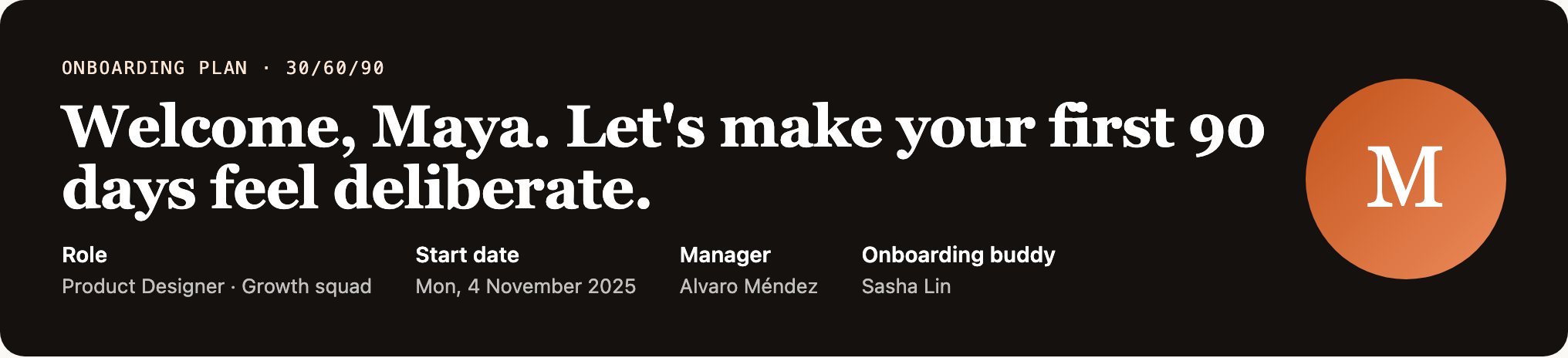
This official OpenDesign example presents a Northwind onboarding plan for Maya, a Product Designer joining the Growth squad. Its opening title, “Welcome, Maya. Let's make your first 90 days feel deliberate.”, is followed by four identity fields: Role, Start date, Manager, and Onboarding buddy.
The composition treats onboarding as a readable document rather than a demonstrated HR system. The visible content is illustrative, including the employee name, dates, people, schedules, policies, and resource destinations. That distinction lets the design communicate how information is organized without claiming connected services or completed tasks.
Onboarding Planning Tasks
The guide is designed for a new hire who needs to know what happens next and what preparation looks like. The Day 1 sequence starts at 09:00 with “Kickoff with Alvaro,” moves through IT setup, coffee with Sasha, team lunch, reading, a first docs-site pull request, and a 17:00 check-in. Each row pairs a time with an activity and explanatory detail.
The ordering creates a practical handoff from orientation to access, social context, independent exploration, and a small contribution. Its tradeoff is density: seven rows make the day concrete, but the long descriptions require scanning rather than quick glance-only use. The repeated time column supplies the scan anchor.
| Planning Horizon | Visible Format | Role in the Guide |
|---|---|---|
| Day One | Seven timed agenda rows, from 09:00 to 17:00 | Coordinates a concrete introductory schedule. |
| First Week | Five weekday cards with two activities each | Bounds the short-term plan without becoming a full calendar. |
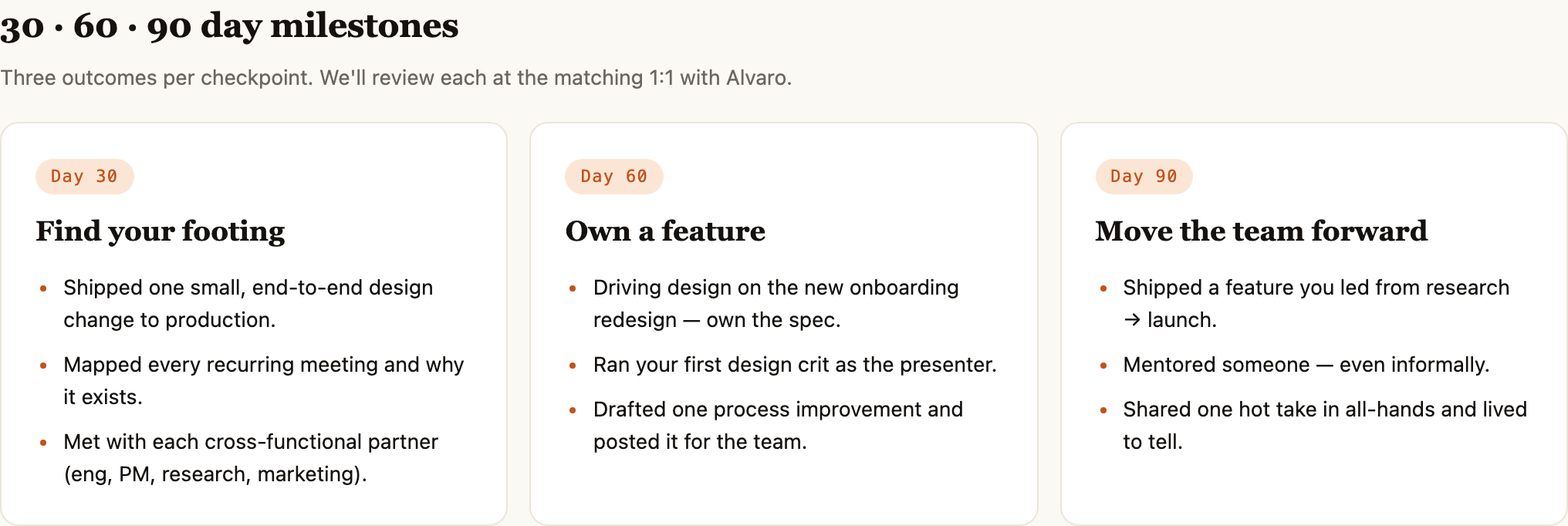
| Days 30, 60 and 90 | Three milestone cards with qualitative goals | Frames later check-in conversations, not verified performance scores. |
A Week With Deliberate Limits
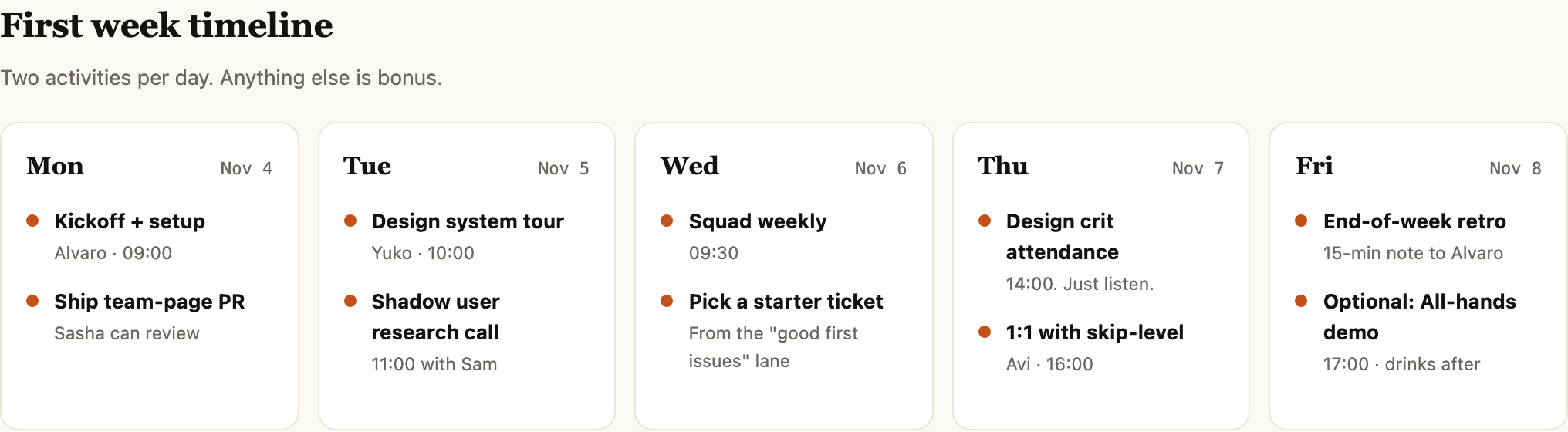
The first-week section states, “Two activities per day. Anything else is bonus.” Its five equal cards are labeled Mon Nov 4 through Fri Nov 8, with a tour and research call in the Tuesday card and critique plus a skip-level 1:1 in Thursday's card. These are sample labels: the cover names 2025, but 4 November 2025 falls on Tuesday. The weekday/date pairs would need reconciliation before becoming a real schedule.
This consistent two-item rhythm makes the week feel bounded while leaving room for unlisted work. The tradeoff is that secondary context is compressed into short supporting lines, such as “11:00 with Sam” or “From the good first issues lane,” so the section works best as a planning view rather than a full calendar record.
Concrete Planning Inputs
A team could adapt this structure when the important question is not only who attends onboarding, but what a person should be able to locate, try, and discuss during the first week. Preserve the distinction between scheduled commitments, optional events, and contextual notes; the Friday “Optional: All-hands demo” is visibly different from the end-of-week retro.
Day-One Schedule And Milestone Composition
The design uses a wide, centered content area with a maximum width of 1080px. The dark welcome banner establishes a strong entry point, while the following sections return to a light background and large serif headings. A single orange accent appears in the circular initial mark, timeline bullets, and milestone labels, linking separate sections without turning them into one continuous panel.
The first-day agenda uses a large bordered block with horizontal dividers. The time labels remain in a narrow left column while activity names and descriptions occupy the larger right column. This proportion makes the schedule easy to scan, but it also means longer activity descriptions depend on the available width and will become taller when wrapped.
Schedule
Timed rows make the first day concrete from 09:00 kickoff through the 17:00 check-in.
Progression
Day 30, Day 60, and Day 90 cards describe increasing scope without numeric scoring.
Readiness
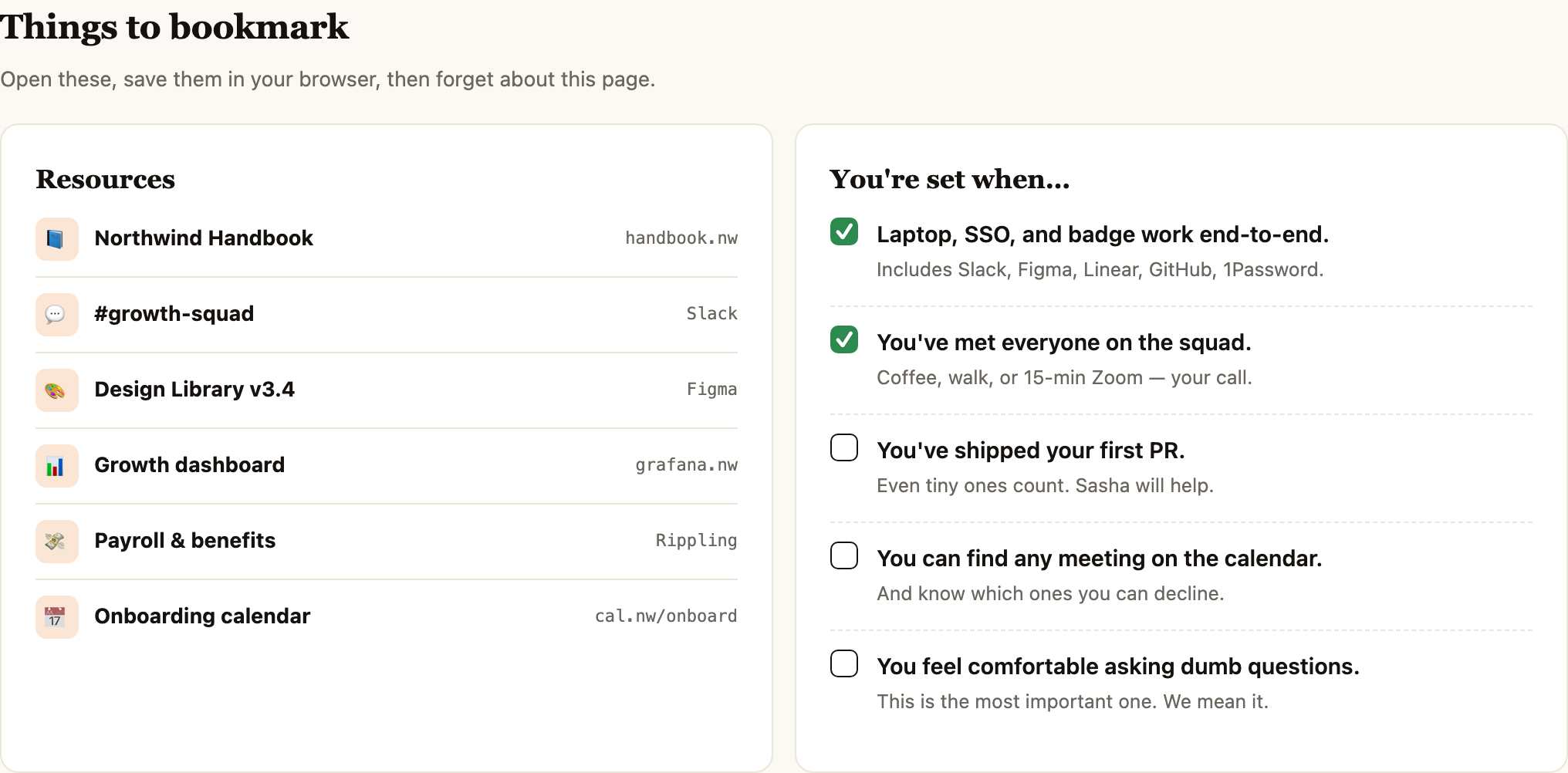
Resources and checklist items show the difference between finding information and feeling prepared.
Milestones As Outcomes
The “30 · 60 · 90 day milestones” section changes from chronological time rows to three side-by-side cards. Each card contains a day label, a short outcome title, and three bullets. “Find your footing” covers a small end-to-end design change, recurring meetings, and cross-functional introductions; “Own a feature” adds specification ownership and presenting a design crit; “Move the team forward” reaches research-to-launch leadership, mentoring, and an all-hands contribution.
This progression gives the reader a definition of advancement rather than another list of meetings. Its tradeoff is that the outcomes are qualitative statements, not tracked performance measurements. The design should therefore be read as a conversation framework for matching 1:1s, as the supporting text explicitly states.
Resources Beside Readiness
The final section places six plain-text resource labels beside a “You're set when…” checklist. The resources name the Northwind Handbook, #growth-squad, Design Library v3.4, Growth dashboard, Payroll & benefits, and Onboarding calendar. Access setup and meeting the squad are drawn checked; shipping a first PR, finding calendar meetings, and asking questions are drawn unchecked. These are authored document states, not working links or verified completion.
The side-by-side arrangement connects where to go with what readiness can look like. It also makes the boundary visible: checkboxes are depicted states in the document, not evidence of a live completion system.
Illustrative Document Boundary
This artifact is an onboarding document with sample identities, schedules, policies, tools, and company resources. The captures show the content and its visual states, but they do not establish live calendar links, working access checks, connected HR records, storage, or completed submissions. The “Growth dashboard” and other destinations are labels within the example.
For a real implementation, preserve the visible distinction between planned activities and verified status. Replace illustrative names and destinations only when those facts are confirmed, and decide separately whether checklist state should remain editorial, be entered by a manager, or come from another system. That proposed adaptation is not part of the supplied artifact's demonstrated behavior.
How to Create Employee Onboarding Guide Design in OpenDesign
Set The Document Structure
Start with a welcome overview containing the employee role, start date, manager, and buddy. Follow it with a Day 1 schedule, a five-day first-week timeline, 30/60/90 milestone cards, and a final resources-and-readiness area.
Draft The Northwind-Like Content Model
Use concrete fields and relationships from this example: timed activities have owners and descriptions; weekly cards have dates and two activities; each milestone has three outcomes; resources have names and destinations; readiness items have visible checked or unchecked states.
Suggested PromptCreate an employee onboarding guide design for a Product Designer joining a Growth squad. Use a dark welcome banner with role, start date, manager, and buddy; a Day 1 schedule from 09:00 to 17:00; five first-week day cards with two activities each; 30/60/90 milestone cards with three outcomes each; and a two-column resources and readiness section. Treat all names, dates, URLs, and checklist states as illustrative document content, not live integrations or verified completion.
Refine The Reading Order
Check that the welcome context leads into immediate tasks, weekly planning, milestone conversations, and resources. Keep times distinct from activity descriptions and preserve optional events such as Friday's all-hands demo. Before adapting the sample, reconcile the stated year with each weekday/date pair; the original November 4 Monday label does not match 2025.
Check The Capability Boundary
Review every destination, identity, status, and checkbox as visible content. Ensure the finished design does not imply that calendar access, SSO, dashboards, HR records, or submissions are connected unless those capabilities are separately implemented and verified.
Export and Get a Share Link
Export your finished design, then use Share in OpenDesign to get a share link. Open the link in a separate browser window and check that the intended version and its assets are available before sending it.

AI Workflow Editorial Poster Design
AI Workflow Editorial Poster Design presents six illustrated workflow claims with numbered chapters, concrete prompt specimens, and cream-and-rust typography.
Graphics
AI Workflow Social Carousel Design
Seven portrait cards use oversized Chinese headings, numbered habits, changing color fields, and a closing statement to explain AI editing workflows.
Graphics
Aurora Field Shader Design
An automatically animated blue-green noise field gives a WebGL hero its atmosphere, while a fixed headline and small local frame-rate badge anchor the scene.
Graphics
Aurora Veil Shader Design
Aurora Veil is an interactive shader composition that turns layered light, stars, and cursor motion into an atmospheric WebGL hero.
Graphics