

Graphics
Frontend Engineer Resume Design
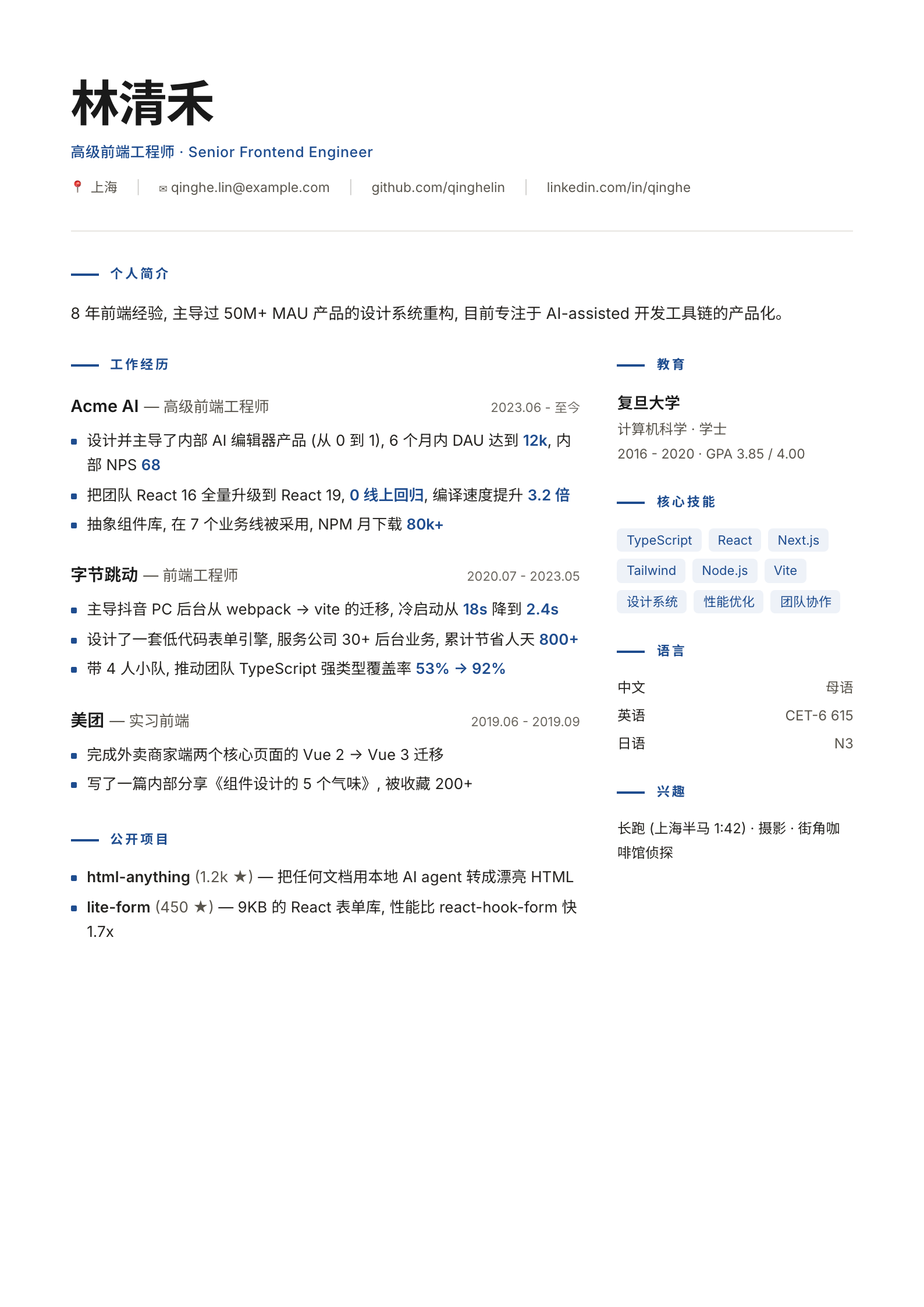
This two-column Chinese resume design pairs a detailed career timeline with compact skills, education, and language sections.

Resume Design Use Cases
- Senior Frontend Engineer ResumesPresent a technical career across roles, projects, and skills.
- Chinese Technical ResumesCombine Chinese descriptions with familiar English technical terms.
- Technical Career SummariesConnect engineering work to concrete measures and outcomes.
Resume Layout Highlights
- Career-Led Reading OrderProfile first, followed by dated roles and public projects.
- Two-Column InformationExperience occupies the wider column; credentials sit alongside.
- Selective Blue EmphasisKey figures and section markers stand apart from body text.
The Frontend Engineer Resume, Column By Column
1 / 3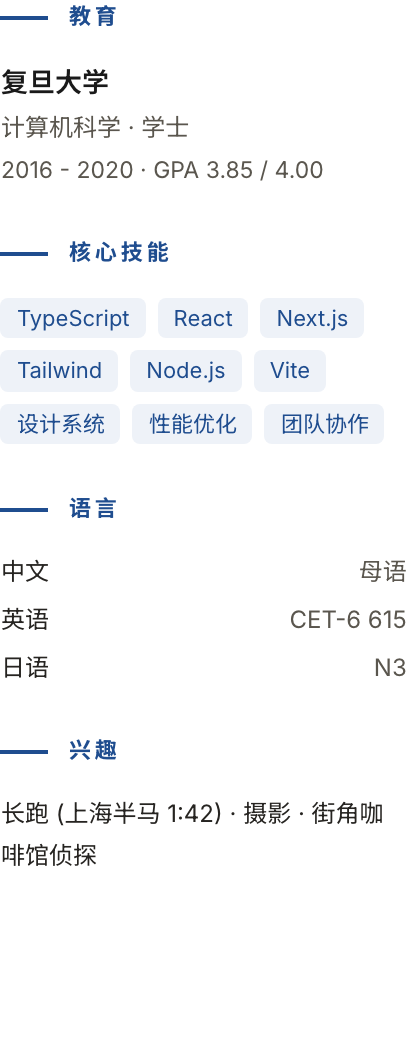
A Chinese Frontend Engineer Resume
Distributed in the OpenDesign Community library with HTMLAnything declared as its upstream, this Chinese resume depicts a sample senior frontend engineer. The heading pairs the Chinese role with “Senior Frontend Engineer,” while the contact row groups Shanghai, email, GitHub and LinkedIn beneath the name. A short profile claims eight years of frontend experience, a design-system refactor for a product described as serving 50M+ MAU, and a focus on AI-assisted development tools. These are illustrative credentials, not verified personal history.
Placing the profile before the experience section gives the reader a compact framing statement before the denser evidence that follows. The contact row keeps practical details visible near the name, though its several inline items may need reflow in narrower formats.
Where This Resume Structure Fits
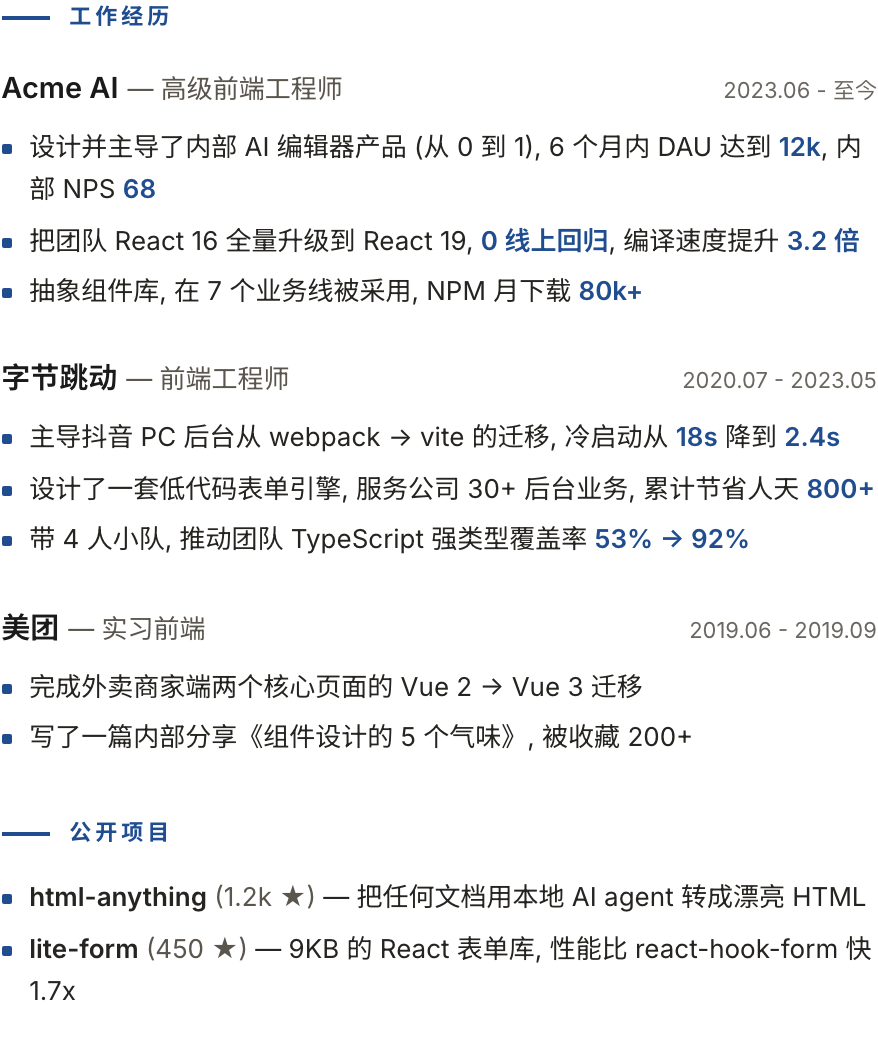
This design suits a technical candidate whose story depends on career progression and engineering scope. In the sample experience column, Acme AI, ByteDance and Meituan appear in reverse chronological order, each with a role and date range. Bullets beneath them depict work such as a React 16-to-19 upgrade and a webpack-to-Vite migration. The company names, chronology and results belong to the sample; this page does not verify the depicted person’s employment.
This sequence helps readers scan employers and dates before considering the claims attached to each role. It also gives projects a distinct place after employment history: “公开项目” lists html-anything and lite-form with short descriptions. That separation can help independent work remain visible without interrupting the career timeline. Candidates with a different emphasis could adapt the order, but should preserve a clear distinction between employment and separately presented projects.
Career Progression
Use dated role groups when changes in responsibility or technical focus are central to the candidate’s story.
Independent Work
Give public projects their own section when they add evidence beyond the employment record.
How The Two Columns Divide The Content
The page uses a 210 mm-wide layout. In the full capture, experience and public projects take the broader left side, while education, skills, languages, and interests occupy the narrower right. This proportion reflects the content: role descriptions contain longer, wrapped bullet points, whereas the right column uses short entries and compact lists.
The full-width introduction is labeled “个人简介.” Beneath it, the left column proceeds from “工作经历” to “公开项目,” while the right column contains “教育,” “核心技能,” “语言,” and “兴趣.” The career side holds the longer narrative; the sidebar is a compact reference for qualifications. Longer employment bullets can make that side visually heavier than the shorter credentials column.
Main Column
Dated experience and project descriptions carry the longer, explanatory content.
Sidebar
Education, skill labels, language levels, and interests use compact entries.
Dated Role Entries And Evidence
Each job starts with an organization and role, with its date range aligned opposite. The Acme AI entry has three bullets: an internal AI editor with stated DAU and NPS figures, a framework upgrade with a regression claim and compiler-speed comparison, and a component library with adoption and download figures. The mix shows how this design accommodates product, migration, and reuse claims under one role.
Blue emphasis draws attention to selected values such as “12k,” “68,” and “3.2 倍.” That helps scanning, but it can also make numbers appear more authoritative than their definitions allow. For example, the resume does not define how NPS was measured or the comparison conditions behind the speed claim. When adapting the pattern, retain enough context to explain what each metric refers to rather than highlighting a figure alone. The supplied claims remain illustrative.
Compact Lists Change The Reading Rhythm
The skills section uses short labeled chips, including TypeScript, React, Next.js, and Vite, while languages are arranged as name-and-proficiency pairs: Chinese and “母语,” English and “CET-6 615,” Japanese and “N3.” Education is similarly compact, placing Fudan University, degree, dates, and GPA in a small block. These short forms make the sidebar quick to skim, but leave less room for explaining proficiency, coursework, or skill depth.
The interests entry is longer and wraps across lines, illustrating that even a compact column needs allowance for natural text wrapping. In a new version, the content should determine the sidebar’s length; it should not be compressed so aggressively that distinctions between skill names, qualifications, and evidence disappear.
What The Design Shows
The captures show a static resume and illustrative personal, employment and education claims. Contact details are ordinary spans in the source, not working email or profile links; no recruitment service or data source is connected. A print stylesheet removes the outer background and shadow, but does not implement a PDF-export control or establish applicant-tracking-system compatibility. Metrics, qualifications, project stars and performance comparisons require separate verification. The bundled manifest’s MIT declaration does not establish separate licensing for every depicted asset.
How to Create Frontend Engineer Resume Design in OpenDesign
Set The Page And Column Roles
Start with a portrait page and a full-width name, contact row, and short profile. Below that introduction, assign the wider left column to dated work history and public projects, and the narrower right column to education, skills, languages, and interests. Leave enough space for wrapped evidence bullets.
Suggested PromptCreate a Chinese senior frontend engineer resume design on a 210 mm-wide portrait page. Put the name, bilingual role label, contact row, and short profile across the full width above a two-column grid. Use the wider left column for reverse-chronological work history and public projects, and the narrower right column for education, skill labels, language levels, and interests. Use clearly illustrative sample content and restrained blue emphasis for section markers and selected figures. Keep employment and proficiency claims unverified unless I supply evidence; do not imply live links or connected services.
Write Evidence In Role Groups
For each role, provide organization, title, dates, and a small set of concise bullets. Keep the example’s mix of product work, framework migration, and component-library adoption only when those categories fit the candidate. Define comparisons and metrics in the surrounding text; do not rely on highlighted numbers to supply their own context.
Refine The Sidebar And Wrap
Keep skill names distinct from language qualifications, and include the level or evidence that gives each entry meaning. Review longer interest or education lines at the intended page width so wrapping does not obscure the section structure. The reference is a static design example, so do not add assumptions about link behavior, persistence, or a production data source.
Export and Get a Share Link
Export your finished design, then use Share in OpenDesign to get a share link. Open the link in a separate browser window and check that the intended version and its assets are available before sending it.

AI Workflow Editorial Poster Design
AI Workflow Editorial Poster Design presents six illustrated workflow claims with numbered chapters, concrete prompt specimens, and cream-and-rust typography.
Graphics
AI Workflow Social Carousel Design
Seven portrait cards use oversized Chinese headings, numbered habits, changing color fields, and a closing statement to explain AI editing workflows.
Graphics
Aurora Field Shader Design
An automatically animated blue-green noise field gives a WebGL hero its atmosphere, while a fixed headline and small local frame-rate badge anchor the scene.
Graphics
Aurora Veil Shader Design
Aurora Veil is an interactive shader composition that turns layered light, stars, and cursor motion into an atmospheric WebGL hero.
Graphics