

Graphics
Kinetic Globe Typography Design
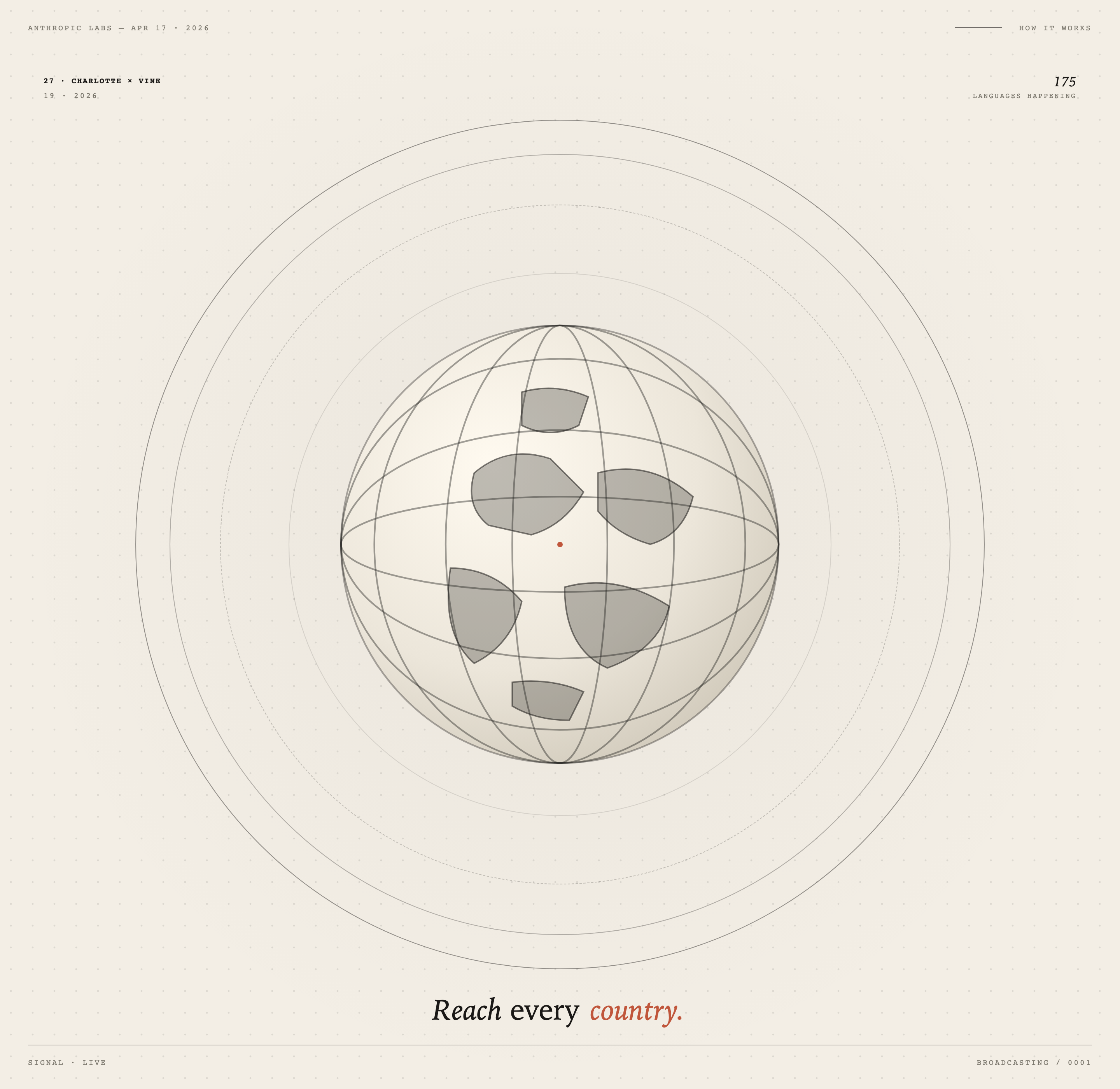
A rotating wireframe globe, nested orbit lines, and rust-accented serif type form a warm editorial motion study about international reach.

Kinetic Typography Use Cases
- Motion Editorial SystemsBuild animated compositions that combine labels, geometry, and pacing.
- Global Campaign ConceptsFrame international reach through symbolic maps and structured information.
- Event Broadcast GraphicsCreate screen-led identities for launches, talks, and live moments.
- Creative Coding StudiesExplore local HTML motion using scalable geometric composition.
Orbital Composition Highlights
- Orbital GlobeLayered rings and meridians create a rotating planetary focal point.
- Editorial MarkersSmall labels establish event, date, signal, and broadcast context.
- Typography ContrastMonospaced metadata meets a large italic statement for emphasis.
- Responsive ScaleThe square composition scales against the viewport without changing structure.
The Globe Composition
1 / 1Kinetic Globe Typography Design
Kinetic Globe Typography Design is an official OpenDesign graphic example built around an orbital globe and editorial typography. The visible artwork begins with “ANTHROPIC LABS — APR 17 · 2026” and “HOW IT WORKS,” then moves inward to “27 · CHARLOTTE × VINE,” “19 · 2026,” and “175 LANGUAGES HAPPENING.” These labels give the composition a reading order: context first, event details second, and a large visual statement last.
The central globe uses nested circular paths, curved latitude lines, vertical meridians, and irregular gray land-like forms around a small orange center point. The geometry reads as a symbolic world rather than a geographic map. That choice keeps the design legible as motion artwork, while giving the typography a stable center to orbit around.
Context Layer
Upper labels establish the named event, date, and “HOW IT WORKS” framing before the eye reaches the globe.
Signal Layer
The lower line, “SIGNAL · LIVE,” paired with “BROADCASTING / 0001,” gives the composition a transmission-oriented closing frame.
Statement Layer
“Reach every country.” is set larger than the surrounding metadata, making the intended message the visual resolution.
Use Cases For Global Signals
This design is useful when a visual identity needs to make scale feel tangible without relying on a literal dashboard. A campaign concept could adapt the orbital globe for an international announcement, while retaining the top metadata as a date-and-subject index. The tradeoff is deliberate: symbolic geography communicates reach quickly, but it does not communicate actual coverage or measured performance.
For broadcast-oriented artwork, the repeated labels provide framing information that can persist while the globe moves. “SIGNAL · LIVE” and “BROADCASTING / 0001” suggest a sequence or transmission state in the visible design, but they are graphic language rather than proof of a connected live service. The same structure could support a series of numbered scenes if that behavior were implemented separately.
Reading Order And Scale
The composition places compact, uppercase metadata near the edges and reserves the largest type for the closing statement near the bottom. This contrast lets viewers scan factual-looking context before landing on the message. It also creates a tradeoff: the small labels carry atmosphere and sequencing, but they require sufficient display size to remain readable.
Local Motion Language
The shipped example is an animated HTML editorial artwork. Its CSS defines the main area at 100vw and the composition as a square with a width capped at min(78vh, 78vw). In practice, that keeps the square from exceeding either viewport dimension while preserving the orbital geometry. The visual technique supports local rendering; it does not establish video, audio, or live-data capability.
Composition And Motion
The globe is built from several line weights and ring types: solid outer circles, lighter interior arcs, and a dashed orbit that expands the field beyond the main sphere. The repeated curves create motion cues even in a still capture, because the eye can compare their intersections and spacing. The cost is density: adding more rings or labels would compete with the central globe and reduce the emphasis of the orange center point.
The palette stays near warm off-white, charcoal, gray, and a single rust-orange accent. The restrained colors make the italic “country.” and central point function as linked emphasis marks. Typography supplies the hierarchy that color does not: widely tracked uppercase labels feel technical, while the large italic serif statement introduces editorial warmth.
| Layer | Timing | Role in the Composition |
|---|---|---|
| Three solid orbital rings | 60, 90 and 36 seconds per rotation | The second ring reverses direction. Because solid circles are rotationally symmetric, their rotation alone does not create an obvious moving marker. |
| Dashed orbital ring | 180 seconds per rotation | The repeated dashes provide visible orientation changes across a slow cycle. |
| Wireframe globe | 38 seconds per reverse rotation | The meridians and six irregular land-like shapes turn together within the circular globe. |
| Rust-orange center point | 2.6-second repeating pulse | A changing scale and expanding shadow emphasize the common center. |
| Closing headline | 1.4-second entrance | Opacity and letter spacing settle into the large closing statement; this entrance does not repeat. |
Capability Boundary
This artifact is a design-only HTML motion example with one supplied HTML file and no local media files. The capture verifies visible labels, geometry, color, typography, and composition; it does not verify live broadcasting, language coverage, data connections, audio, video export, or the original creation prompt. The names, dates, figures, and claims shown in the artwork should therefore be treated as illustrative source artwork unless independently verified.
A recreation can preserve the visible design logic while changing the labels and data to fit a real brief. Any future implementation should define its own motion behavior, content source, accessibility treatment, and output requirements rather than assuming they are provided by this example.
How to Create Kinetic Globe Typography Design in OpenDesign
Set The Orbital Composition
Start with a square editorial canvas that scales within the viewport. Place a centered globe made from nested rings, curved latitude lines, vertical meridians, and a small rust-orange center point. Keep the orbital field larger than the globe so the motion has room to read.
Add The Editorial Data
Use the artifact's reading order as a content model: top context label, event and date markers, a right-side language statement, then the large closing message and lower signal line. Treat values such as “175 LANGUAGES HAPPENING” as illustrative copy unless your brief supplies verified data.
Suggested PromptCreate a Kinetic Globe Typography Design as local HTML motion artwork: use a warm off-white dotted field, a centered square orbital globe with nested circles, curved latitude lines, vertical meridians, gray land-like shapes, and one rust-orange center point. Add the exact visible layout roles of top event metadata, right-side language label, bottom “Reach every country.” statement, and lower “SIGNAL · LIVE” plus broadcast index. Keep it design-only with no assumed live services, audio, video, external data, or backend behavior.
Refine The Motion And Boundary
Animate the orbital geometry locally so line movement supports the typography instead of obscuring it. Check the square scaling rule at narrow and wide viewports, preserve the empty space around the globe, and verify that the small uppercase labels remain readable. Keep any proposed interaction or data behavior explicitly separate from the visible artwork.
Export and Get a Share Link
Export your finished design, then use Share in OpenDesign to get a share link. Open the link in a separate browser window and check that the intended version and its assets are available before sending it.

AI Workflow Editorial Poster Design
AI Workflow Editorial Poster Design presents six illustrated workflow claims with numbered chapters, concrete prompt specimens, and cream-and-rust typography.
Graphics
AI Workflow Social Carousel Design
Seven portrait cards use oversized Chinese headings, numbered habits, changing color fields, and a closing statement to explain AI editing workflows.
Graphics
Aurora Field Shader Design
An automatically animated blue-green noise field gives a WebGL hero its atmosphere, while a fixed headline and small local frame-rate badge anchor the scene.
Graphics
Aurora Veil Shader Design
Aurora Veil is an interactive shader composition that turns layered light, stars, and cursor motion into an atmospheric WebGL hero.
Graphics