

Graphics
Studio Invoice Design
Studio Invoice Design organizes project scope, itemized fees, payment terms, adjustments, and payment notes into one long client document.

Studio Invoice Use Cases
- Independent StudiosPresent services and payment details in one client-ready document
- Brand ConsultantsConnect project scope, fees, retainers, and handoff work
- Accounts Payable TeamsFind invoice identity, purchase order, and payment information
- Editorial Document DesignersStudy structured typography for dense financial communication
Studio Invoice Highlights
- Scope Before CostProject context appears before detailed billable line items
- Explicit AdjustmentsRetainer and tax changes remain visible beside totals
- Dual Payment PathsWire, ACH, and online payment details share one section
- Print-Aware StylingPrint rules remove the shadow and border and reduce page padding.
The Studio Invoice, from Header to Payment Notes
1 / 1About The Studio Invoice Design
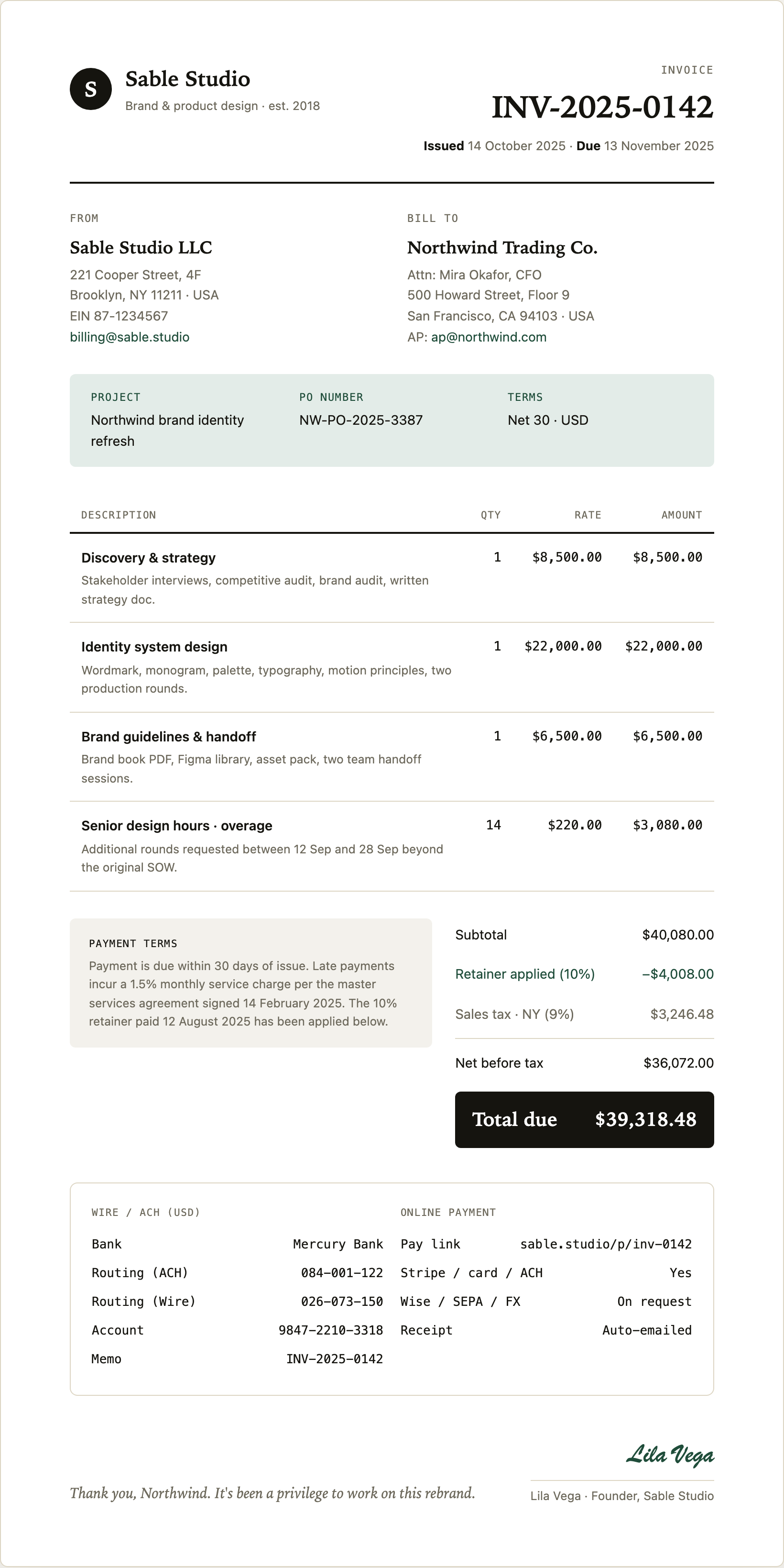
Studio Invoice Design is an official OpenDesign example for a Sable Studio client invoice. Its visible composition combines a studio identity, invoice metadata, client and sender details, project context, billable work, settlement terms, payment instructions, and a closing signature into one long document.
The header establishes the document type with the label “INVOICE,” identifier “INV-2025-0142,” and the issued and due dates. That ordering gives the reader the document reference and timing before asking them to interpret the commercial detail. The dates and sample identities are illustrative content within the design, not evidence of a payable transaction.
The sender and recipient blocks use parallel labels, “FROM” and “BILL TO,” so responsibility and destination can be checked in the same horizontal band. The green email addresses are authored mail links, while the screenshot only demonstrates their visible presentation, not a tested mail workflow.
Use Cases For This Invoice Design
The design is useful when a service invoice must explain what was delivered as well as what is owed. The project strip names “Northwind brand identity refresh,” includes purchase order “NW-PO-2025-3387,” and states “Net 30 · USD.” Those three fields connect the document to an engagement, an internal procurement reference, and a payment convention before the reader reaches the amounts.
Its strongest use is for project-based studios with a mix of fixed-scope services and variable work. The first three rows each show quantity 1, while “Senior design hours · overage” shows quantity 14 at a $220.00 rate. The different quantity pattern makes the overage legible as a time-based addition rather than another packaged deliverable.
Client Review
Use the paired party blocks and project strip to confirm who issued the invoice, who receives it, and which purchase order belongs to the work.
Internal Reconciliation
Use the itemized descriptions, quantities, rates, retainer adjustment, and tax line to compare the document with an engagement record.
Payment Handoff
Use the final payment panel to keep bank instructions, online payment availability, foreign-exchange notes, and receipt treatment together.
Composition And Reading Order
The page moves from high-level identification to supporting detail in five deliberate stages. A black circular “S” mark and Sable Studio wordmark establish the sender; the large invoice number and dates establish document status; the two-column party area identifies the transaction; the pale green project band supplies context; and the item table carries the main financial explanation.
The line-item table gives “DESCRIPTION” the widest visual area, leaving narrower columns for “QTY,” “RATE,” and “AMOUNT.” This proportion accommodates explanatory copy such as “Stakeholder interviews, competitive audit, brand audit, written strategy doc.” The tradeoff is vertical length: descriptions wrap across multiple lines, but the reader can understand the service before scanning its numeric value.
Payment terms sit beside the totals. The sample's $40,080 subtotal less its $4,008 retainer gives $36,072 before tax. Applying the sample 9% rate produces $3,246.48, leading to $39,318.48 due. The tax row appears above “Net before tax,” so the visual order differs from the calculation order. The dark final band makes the result prominent, but the preceding labels remain necessary to check how it was assembled.
| Invoice Block | Visible Evidence | Reader's Task |
|---|---|---|
| Header | Invoice number, issue date, due date | Identify the document and its timing |
| Project Strip | Project name, PO number, Net 30 · USD | Connect the charge to an engagement |
| Line Items | Description, quantity, rate, amount | Understand the work behind each charge |
| Settlement Area | Payment terms, subtotal, retainer, tax, total due | Reconcile the amount and its adjustments |
Scope And Capability Boundary
This design-only invoice example uses a document container with a source maximum width of 820 pixels. Print styles remove its shadow and border and reduce padding; one-sheet print pagination has not been verified. The artwork demonstrates typography, grouping, illustrative content, and authored mailto destinations. It does not establish connected billing, payment processing, automatic receipts, bank verification, or live tax calculation.
The lower panel presents “WIRE / ACH (USD)” and “ONLINE PAYMENT” as document content. It lists Mercury Bank, routing and account values, a pay-link string, “Stripe / card / ACH,” “Wise / SEPA / FX,” and “Auto-emailed.” Treat these as illustrative fields supplied for the composition. A production implementation would need separately verified data, payment controls, and compliance decisions before using comparable content in a real invoice.
How to Create Studio Invoice Design in OpenDesign
Establish The Invoice Structure
Create a long invoice document with a sender identity and a right-aligned invoice block. Include an invoice number, issue date, due date, sender and recipient addresses, project name, purchase order, and payment terms before introducing the item table. If print output matters, inspect pagination separately rather than assuming the entire composition fits one sheet.
Suggested PromptCreate a Studio Invoice Design for a fictional design studio and client. Use a long document with a studio identity at left, invoice number and issue dates at right, paired FROM and BILL TO blocks, a project and purchase-order strip, and an item table with Description, Qty, Rate, and Amount. Add print-aware styles without assuming one-sheet pagination. Use sample data only; do not claim live billing, payment processing, bank verification, or valid tax treatment.
Model Scope And Settlement
Add four case-specific rows: three fixed service rows with quantity 1 and one senior design overage row with quantity 14 and a unit rate. Follow them with payment terms, subtotal, retainer applied, sales tax, net before tax, and total due. Keep explanatory service text wide enough to wrap without obscuring the numeric columns.
Refine Payment Presentation
Place wire and online payment information in a shared lower panel, using separate headings and aligned labels. Preserve the visual distinction between ordinary totals and the emphasized total due, then check that the closing thank-you and signature remain part of the document without implying that sample links, banking data, receipts, or calculations are operational.
Export and Get a Share Link
Export your finished design, then use Share in OpenDesign to get a share link. Open the link in a separate browser window and check that the intended version and its assets are available before sending it.

AI Workflow Editorial Poster Design
AI Workflow Editorial Poster Design presents six illustrated workflow claims with numbered chapters, concrete prompt specimens, and cream-and-rust typography.
Graphics
AI Workflow Social Carousel Design
Seven portrait cards use oversized Chinese headings, numbered habits, changing color fields, and a closing statement to explain AI editing workflows.
Graphics
Aurora Field Shader Design
An automatically animated blue-green noise field gives a WebGL hero its atmosphere, while a fixed headline and small local frame-rate badge anchor the scene.
Graphics
Aurora Veil Shader Design
Aurora Veil is an interactive shader composition that turns layered light, stars, and cursor motion into an atmospheric WebGL hero.
Graphics