Use the Prompt
Add Your Brief
Add your context below. It will be included with the prompt when you copy or download.
Create an editable mobile-first app prototype using the existing project stack for [PROJECT] and [AUDIENCE]. The task is: Craft Project Tracker.
Required content and structure
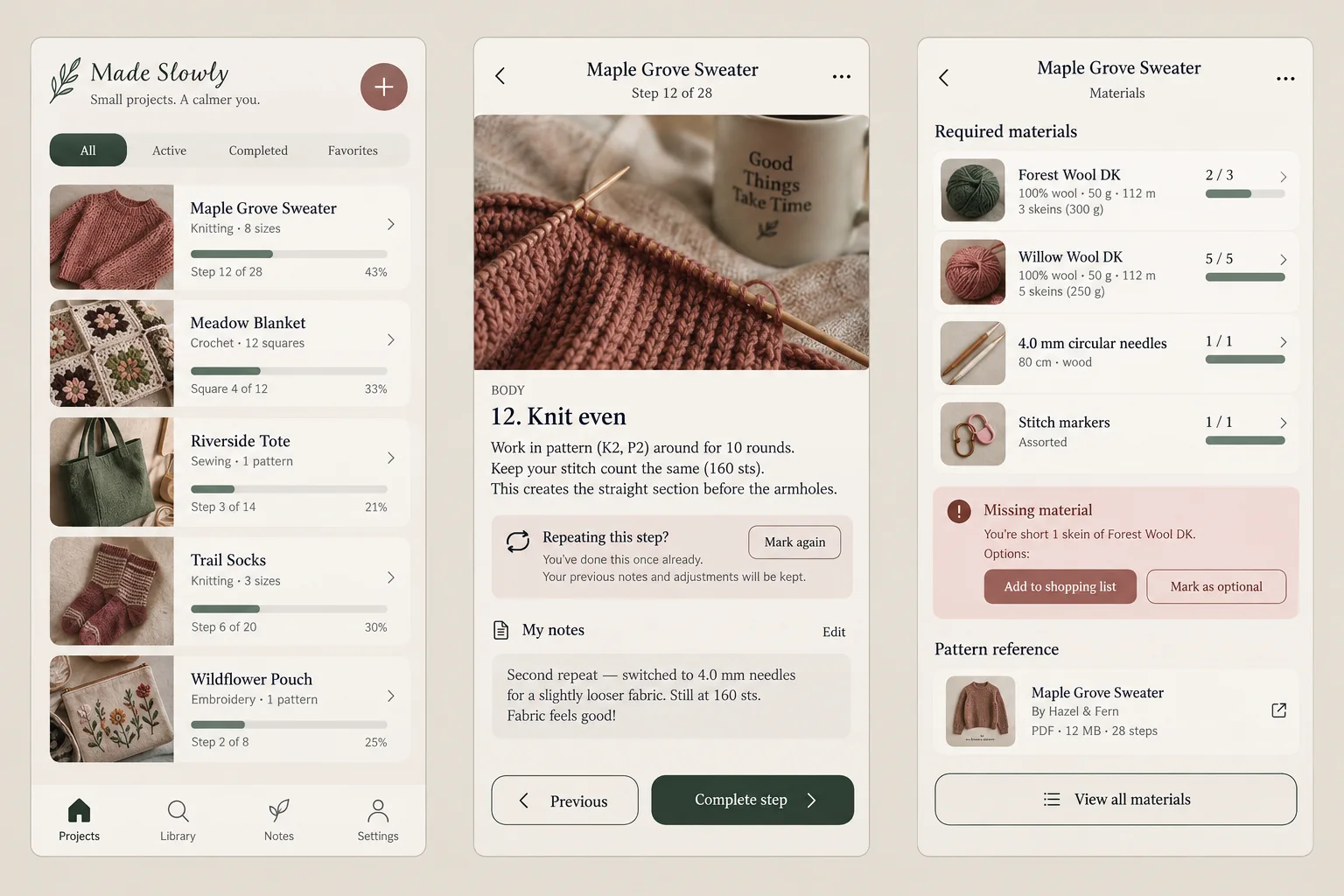
Organize craft projects with materials and pattern references, mark the current step and record adjustments without editing the source pattern.
Screens and navigation
Build three connected views: Projects; Pattern step; Materials. Keep the selected record visible in the screen title or summary. Support an explicit back action and preserve in-progress inputs when moving between views. Keep the primary action near the relevant content and account for mobile safe areas, a visible software keyboard and long translated labels. At desktop widths, adapt the composition without removing a step or changing the task.
Project inputs
Use [APPROVED_CONTENT] for names, records, labels, quantities and destinations. Ask for missing data instead of inventing operational claims. Demonstration records may use the fictional brand Made Slowly; label these as sample data. Explain which actions are local prototype interactions and which would require authentication, persistence, permissions or a backend. Do not connect external services or claim a transaction was completed unless that integration has been explicitly implemented and tested.
Design direction
Follow [BRAND_RULES]. When no brand is supplied, use warm paper, dusty rose, forest ink, textile photography. Make the workflow recognizable through its own content and controls, rather than repeating generic dashboard cards. Use a consistent spacing scale and clear text hierarchy. Include visible keyboard focus, accessible names, sufficient contrast and non-color status labels. Respect reduced motion and keep animated transitions optional.
Task-specific acceptance check
- Handle a missing material and a repeated pattern step while preserving the maker's previous progress.
Interaction states
Implement the three-screen happy path with local sample data. Include a useful empty state, validation before completing an action, a loading or pending state and a recoverable failure state. Destructive changes require a review or undo path. Keep the state of a record consistent across all three views. Do not silently discard partially completed input or change a user's choice after a retry.
Delivery and review
Return the editable app views and explain the data model, any local storage behavior and unimplemented integrations. Test at 320px and a wider viewport, with keyboard navigation and long content. Use the task-specific acceptance check above to review the result before adding features. Keep demonstration behavior clearly distinct from a running production service.
Reference attachment and reconstruction goal
Attach reference.webp from this prompt’s download bundle alongside this prompt in OpenDesign. Build an editable result with a similar composition and hierarchy; do not embed the whole reference image as the finished interface. Preserve approved project content and brand rules if they conflict with fictional sample labels. If the image is missing or unreadable, ask for it instead of claiming visual fidelity.
Reference composition and content
Use the attached reference.webp as the visual reference for Craft Project Tracker. Before building, identify the major regions from top to bottom, their relative widths and heights, alignment, spacing, typography hierarchy, surface colors, borders, imagery and repeated components. Preserve those relationships rather than substituting a generic template. Required task content: Organize craft projects with materials and pattern references, mark the current step and record adjustments without editing the source pattern. Use the following task-specific layout guidance when translating the image into editable elements: Begin with Projects as the entry screen, give Pattern step a clear primary action, and make Materials explain what happened and what can happen next. Use warm paper, dusty rose, forest ink, textile photography as a starting direction, adapting it to the supplied brand. Keep record identity and navigation context visible across the three screens. Prioritize thumb-accessible controls and readable labels over decorative panels; on wider screens, keep the workflow coherent rather than stretching a mobile composition edge to edge.
Visual direction from the example brief
warm paper, dusty rose, forest ink, textile photography.
Interaction specification
The reference is a static concept: the behavior below is a requirement to implement, not proof that the picture already works. Copy the customized prompt into your project and build the connected flow: Organize craft projects with materials and pattern references, mark the current step and record adjustments without editing the source pattern. Handle a missing material and a repeated pattern step while preserving the maker's previous progress. For each visible control, specify its trigger, affected state and feedback; implement local changes with consistent state across related views. Give search and filters real results, selection controls an explicit active state, and save actions visible pending/success/failure feedback where relevant. Do not add unrelated workflows. Use proper links for navigation, buttons for actions and accessible names for icon controls. Do not imply a backend operation succeeded when only a local demo changed.
Visual comparison and delivery
- Compare the result with the attached image at matching proportions. Review major region placement, relative image sizes, line breaks, spacing, typography hierarchy, contrast, active states and content density before polishing decorative details.
- Then test the narrow layout without squeezing desktop text into tiny labels.
- Keep logos, photos and icons as separate assets and all meaningful labels editable. List any unavailable fonts/assets and any intentional departures. Return the working files plus a concise account of implemented behavior and remaining integrations; do not promise a pixel-identical result from the prompt alone.
Download Prompt + Image
Includes the complete prompt and full-size reference image. Attach both in OpenDesign to guide the layout.
How to Write a Craft Project Tracker Design Prompt
Use this craft project tracker design prompt to organize craft projects with materials and pattern references, mark the current step and record adjustments without editing the source pattern.
The reference is an AI-generated concept. The instructions below describe what to build and test; the image does not demonstrate working behavior.
Track Progress Without Editing the Pattern
A craft tracker needs to separate the source instructions from the maker's progress and adjustments.
Repeated steps and missing materials should not destroy an earlier checkpoint. Begin with Projects as the entry screen, give Pattern step a clear primary action, and make Materials explain what happened and what can happen next. Use warm paper, dusty rose, forest ink, textile photography as a starting direction, adapting it to the supplied brand. Keep record identity and navigation context visible across the three screens. Prioritize thumb-accessible controls and readable labels over decorative panels; on wider screens, keep the workflow coherent rather than stretching a mobile composition edge to edge.
From the Prompt
Build three connected views: Projects; Pattern step; Materials.
Make It Your Own
Store [PATTERN_REFERENCE] separately from materials, current step and personal adjustments. Support repeated steps with an occurrence count and preserve prior progress when a material is missing.
Prepare the Craft Project Tracker Content
The middle screen combines a step image, instructions, repeat-step warning and personal notes. Prepare step identifiers and progression rules so completing a repeated step does not lose context.
Choose a sample craft project with materials, a source-pattern reference and a repeated step. Keep personal adjustments in a separate field and define the checkpoint the maker should resume from after an interruption.
From the Prompt
Organize craft projects with materials and pattern references, mark the current step and record adjustments without editing the source pattern.
Make It Your Own
For [PROJECT], use [APPROVED_CONTENT] as the source for this craft project tracker. Approved records and field labels for Projects; Pattern step; Materials; the action and persistence rules; brand assets and permission requirements. Identify missing inputs before replacing them with demonstration content.
Repeat a Step
The materials screen compares required quantities with stock and flags a missing item. Test shopping-list and optional-item actions against the actual project materials.
The maker should be able to record another repetition without overwriting the source pattern or resetting the entire project. Keep the latest checkpoint easy to recover. Test this specific boundary first: Handle a missing material and a repeated pattern step while preserving the maker's previous progress. Then run the main flow with a long record title, no saved records and a failed action. A user should be able to tell what is saved, what is pending and what can be undone without relying on color. Verify that returning to the previous screen preserves entered data and that a screen reader encounters the title, status and primary action in a sensible order.
From the Prompt
Handle a missing material and a repeated pattern step while preserving the maker's previous progress.
Make It Your Own
Review the craft project tracker against this requirement: Handle a missing material and a repeated pattern step while preserving the maker's previous progress. Test this specific boundary first: Handle a missing material and a repeated pattern step while preserving the maker's previous progress. Then run the main flow with a long record title, no saved records and a failed action. A user should be able to tell what is saved, what is pending and what can be undone without relying on color. Verify that returning to the previous screen preserves entered data and that a screen reader encounters the title, status and primary action in a sensible order. Preserve approved content and revise only the parts that fail this check.
Review Your Craft Project Tracker Result
The example is an AI-generated visual concept. Connected services, device permissions and persistent data require separate implementation and testing.
- Handle a missing material and a repeated pattern step while preserving the maker's previous progress.
Follow-Up Prompt
Use this after the first result. It narrows the revision to the most important part of this task.
Refine only the Pattern step to Materials transition. Handle a missing material and a repeated pattern step while preserving the maker's previous progress. Show the relevant pending, failure and completed states with explicit labels. Preserve the approved navigation, typography and other screens. Return the changed views and describe how entered data survives a retry.