

Graphics
Clinical Case Report Design
Clinical Case Report Design organizes a fictional emergency presentation into a readable path from symptoms and observations to investigations, assessment, and management.

Designed For
- Clinical DocumentationStructure complex case information for fast clinical reading.
- Emergency-Medicine EducationPresent simulated presentations with explicit diagnostic reasoning.
- Medical Reference LayoutsSeparate observations, results, decisions, and follow-up actions.
- SOAP-Style ReportsTurn a long case narrative into ordered sections.
Highlights
- Structured Reading OrderMoves from chief complaint through management plan.
- Clinical Data TablesPairs values with ranges and status indicators.
- Reasoning In ContextConnects investigations to differential assessment.
- Action-Oriented PlanningGroups immediate care, monitoring, and disposition.
Clinical Case Report Gallery
1 / 7
Clinical Case Report Design
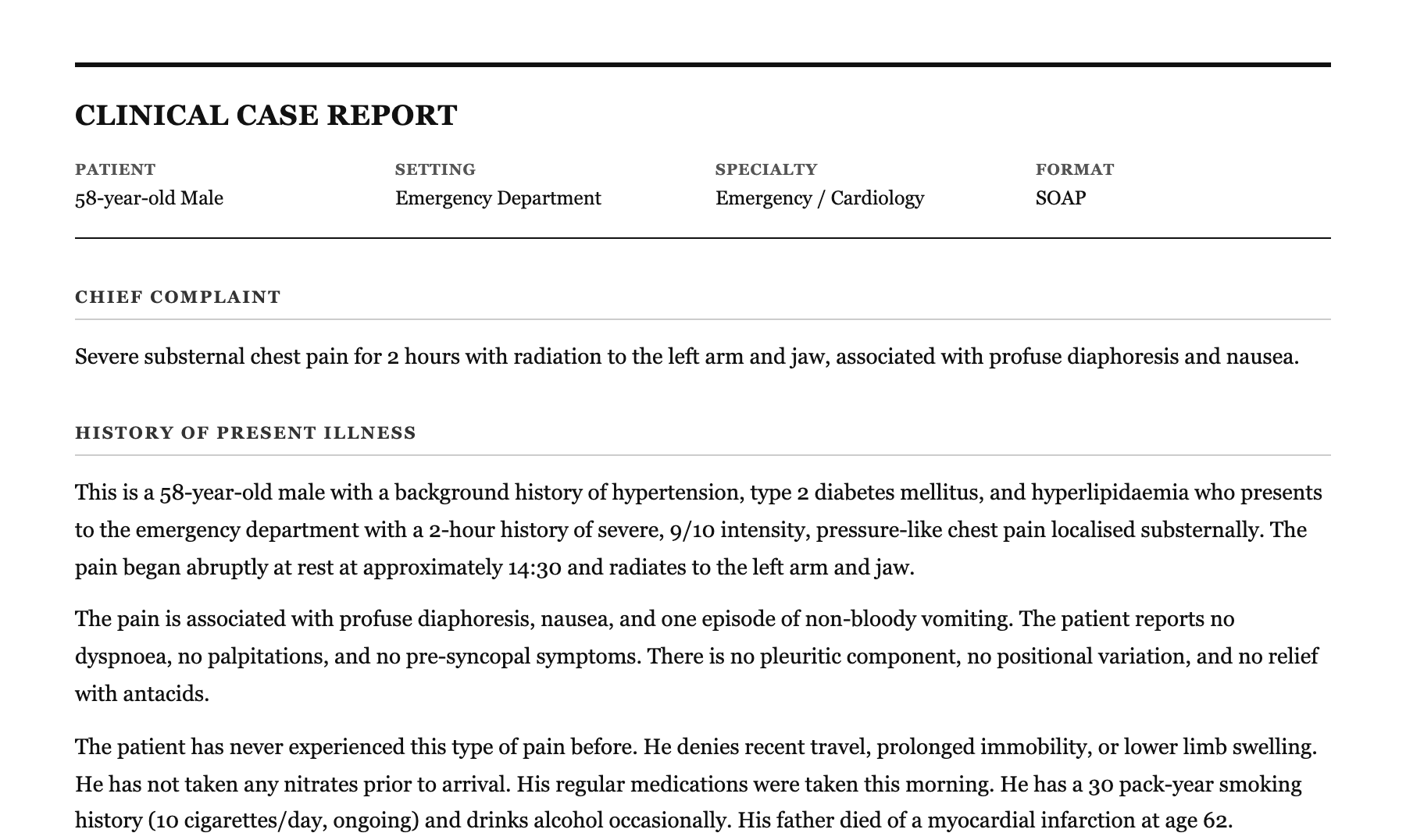
This OpenDesign example presents a fictional emergency-medicine case in a formal clinical report. The authored heading is "Clinical Case Report", and the header establishes four reading anchors: patient, setting, specialty, and format. Together, "58-year-old Male", "Emergency Department", "Emergency / Cardiology", and "SOAP" tell the reader what kind of document they are entering before the clinical narrative begins.
The page starts with "Chief Complaint" and immediately states severe substernal chest pain lasting two hours, radiating to the left arm and jaw, with diaphoresis and nausea. That compressed opening works as an intake summary. The following "History of Present Illness" expands the same event with intensity, onset, associated symptoms, relevant denials, smoking history, and family history, so the reader can move from the presenting signal to the context behind it.
The design uses a restrained document treatment: a wide single-column canvas, strong serif typography, thin horizontal rules, uppercase section labels, and pale gray bands for management subsections. The source CSS sets a maximum body width of 900px, which supports long-form reading while keeping tables and dense clinical lists within a controlled measure.
This is a bundled, official OpenDesign design example authored by OpenDesign. The case details, measurements, claims, and treatment content are illustrative sample material rather than verified patient data or evidence of clinical performance.
Reading The Clinical Narrative
The report's value is its sequence. It does not place every fact in one undifferentiated narrative. Instead, it moves through "Chief Complaint", "History of Present Illness", "Past Medical History", "Vital Signs", "Physical Examination", "Investigations", "Assessment", and "Management Plan". Each section answers a different question, allowing a reader to locate either the patient's story or the decision-making that follows.
The history section demonstrates how repeated facts can gain meaning through placement. Chest pain first appears as a one-sentence complaint, then returns as pressure-like, 9/10 pain that began at rest at approximately 14:30. The later version adds negative findings such as no dyspnoea, palpitations, or positional variation. The tradeoff is length, but the added context makes the later assessment traceable rather than abrupt.
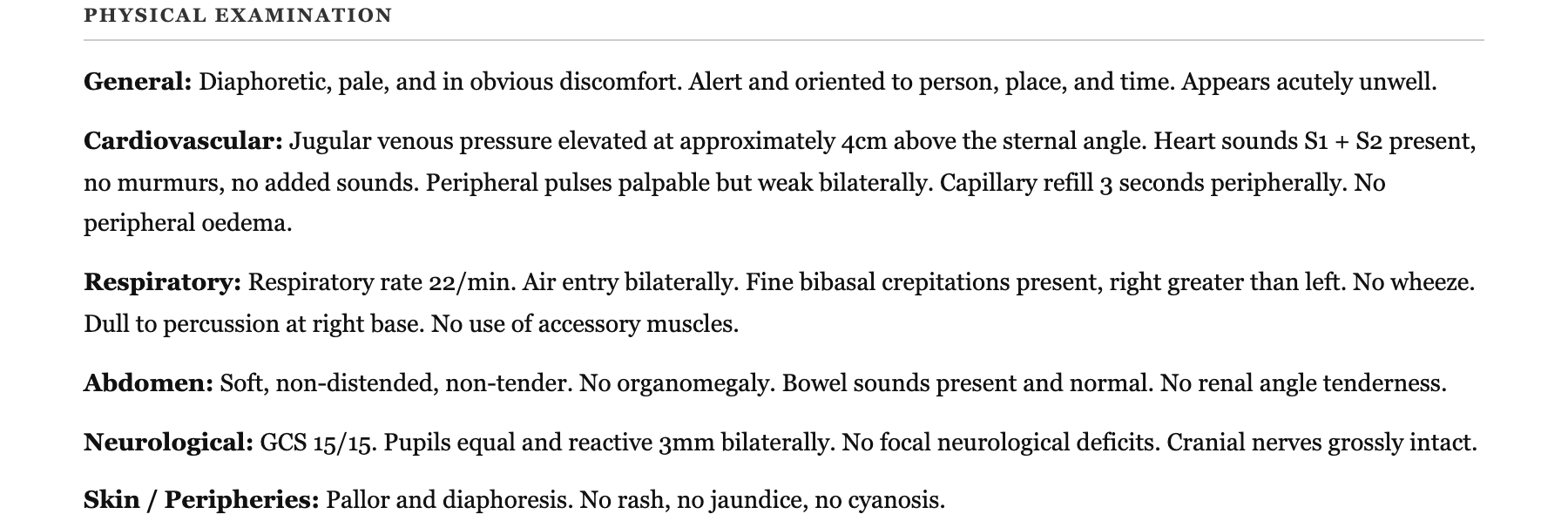
The physical examination uses labeled lines for General, Cardiovascular, Respiratory, Abdomen, Neurological, and Skin / Peripheries. This compact pattern makes it possible to scan body systems without losing prose detail. It also preserves distinctions such as weak peripheral pulses, three-second capillary refill, bibasal crepitations, and a Glasgow Coma Scale of 15/15 instead of reducing the examination to a single severity label.
From Symptom To Context
The complaint is brief; the history supplies onset, intensity, radiation, associated symptoms, and relevant negatives.
From Context To Examination
The examination shifts from subjective history to system-by-system observable findings.
From Findings To Decisions
Investigations and assessment explain why the management plan is ordered as an escalation path.
Data, Emphasis, And Order
The Vital Signs section turns measurements into a comparison interface. Its table uses the columns "Parameter", "Value", "Reference Range", and "Status". For example, "Blood Pressure (Systolic/Diastolic)" is shown as 88 / 60 mmHg against 90-140 / 60-90 mmHg with a hypotensive status, while heart rate is 112 bpm against 60-100 bpm with tachycardia. The relationship between value, reference, and status is more useful than any value alone.
A critical message appears before the table: "CRITICAL - ACTIVATE CATH LAB". It is followed by an ECG summary naming ST elevation in leads II, III, and aVF with reciprocal changes in I and aVL. This ordering makes urgency visible before the reader reaches the supporting rows. The tradeoff is that the alert may compete with the table for attention, so the surrounding layout needs enough whitespace and consistent emphasis to keep the warning distinct.
Investigations then broaden from the 12-lead ECG to laboratory results, portable chest X-ray, and bedside echocardiogram. The laboratory table keeps results beside reference ranges, while the narrative findings add interpretation such as inferior wall hypokinesia, an estimated ejection fraction of 40%, and a pending formal right-sided assessment. The report therefore combines exact fields with short interpretive summaries rather than forcing every modality into the same visual form.
| Observed Field | Supplied Value | Design Relationship |
|---|---|---|
| Blood Pressure (Systolic/Diastolic) | 88 / 60 mmHg | Value is read against a reference range and labeled Hypotensive. |
| Heart Rate | 112 bpm | A numeric measurement is paired with a Tachycardia status. |
| Oxygen Saturation (SpO2) | 94% on room air | The room-air condition is retained beside the value and low status. |
| Glasgow Coma Scale | 15 / 15 | A normal result is shown with its matching reference value. |
Capability Boundary
This artifact demonstrates a document composition and a simulated clinical case, not a connected clinical system. The captures show rendered headings, tables, alerts, and management content, but they do not establish live patient data, backend storage, decision support, guideline validation, medication checking, or clinical efficacy.
The management plan is intentionally action-oriented, with numbered groups such as Immediate - Revascularisation, Antiplatelet and Anticoagulation, Cardiogenic Shock, Respiratory / Oxygenation, Monitoring, Secondary Prevention, and Disposition. That grouping is useful for studying prioritization and information architecture. It should not be treated as prescribing guidance, an operational protocol, or evidence that the displayed sample doses and targets are appropriate for a real patient.
When adapting this design, preserve the boundary between observed case data, interpretation, and proposed management. Keep provenance visible for any real clinical content, validate medical language independently, and treat illustrative values as placeholders until they are replaced by authorized source material.
How to Create Clinical Case Report Design in OpenDesign
Set The Case Structure
Create a single-column report with a concise header for patient, setting, specialty, and format. Use the sequence Chief Complaint, History of Present Illness, Past Medical History, Vital Signs, Physical Examination, Investigations, Assessment, and Management Plan so each section has one clear role.
Suggested PromptCreate a fictional emergency-medicine clinical case report in a 900px maximum-width single-column layout. Use a serif document style with a strong report title, four header fields for patient, setting, specialty, and format, then sections for Chief Complaint, History of Present Illness, Past Medical History, Vital Signs, Physical Examination, Investigations, Assessment, and Management Plan. Use sample data only, and do not imply live clinical services or validated medical advice.
Refine Data Relationships
Build vital-sign and laboratory tables with explicit parameter, value, reference range, and status relationships. Keep units and conditions such as room air beside the measurement. Add a short alert before urgent evidence, but check that color and emphasis do not obscure the underlying values.
Suggested PromptAdd a Vital Signs table with Parameter, Value, Reference Range, and Status columns, including illustrative blood pressure, heart rate, oxygen saturation, temperature, Glasgow Coma Scale, and capillary refill rows. Add an Investigations section with ECG, laboratory, chest X-ray, and bedside echocardiogram summaries. Treat all values as fictional sample data.
Check Reasoning And Boundaries
Review whether every assessment statement can be traced to an earlier symptom, examination finding, or investigation. Organize the management plan by priority, but label simulated or educational material clearly. Confirm that the visual hierarchy separates observation, interpretation, and proposed action without claiming runtime validation or clinical outcomes.
Export and Get a Share Link
Export your finished design, then use Share in OpenDesign to get a share link. Open the link in a separate browser window and check that the intended version and its assets are available before sending it.

AI Workflow Editorial Poster Design
AI Workflow Editorial Poster Design presents six illustrated workflow claims with numbered chapters, concrete prompt specimens, and cream-and-rust typography.
Graphics
AI Workflow Social Carousel Design
Seven portrait cards use oversized Chinese headings, numbered habits, changing color fields, and a closing statement to explain AI editing workflows.
Graphics
Aurora Field Shader Design
An automatically animated blue-green noise field gives a WebGL hero its atmosphere, while a fixed headline and small local frame-rate badge anchor the scene.
Graphics
Aurora Veil Shader Design
Aurora Veil is an interactive shader composition that turns layered light, stars, and cursor motion into an atmospheric WebGL hero.
Graphics