

Graphics
Pixel Sprite Motion Poster Design
A cream editorial motion poster pairs a pixel-art flower card with oversized 1889 typography, animated Japanese lettering, and a scrolling timeline.

Motion Poster Use Cases
- Editorial Motion PostersTurn historical milestones into a single animated visual narrative.
- Pixel-Sprite Art DirectionCombine block-built symbols with disciplined type and limited color.
- Cultural Timeline DesignFrame origin stories through dates, labels, and sequential context.
Pixel Poster Highlights
- Hanafuda CardA pixel flower card anchors the historical subject.
- Oversized Year1889 creates a dramatic period marker.
- Animated LetteringJapanese-character entrance and card movement add local motion.
- Timeline RibbonMilestones extend the poster beyond its central story.
Complete Poster and Sprite Detail
1 / 2Nintendo 1889 Editorial Poster
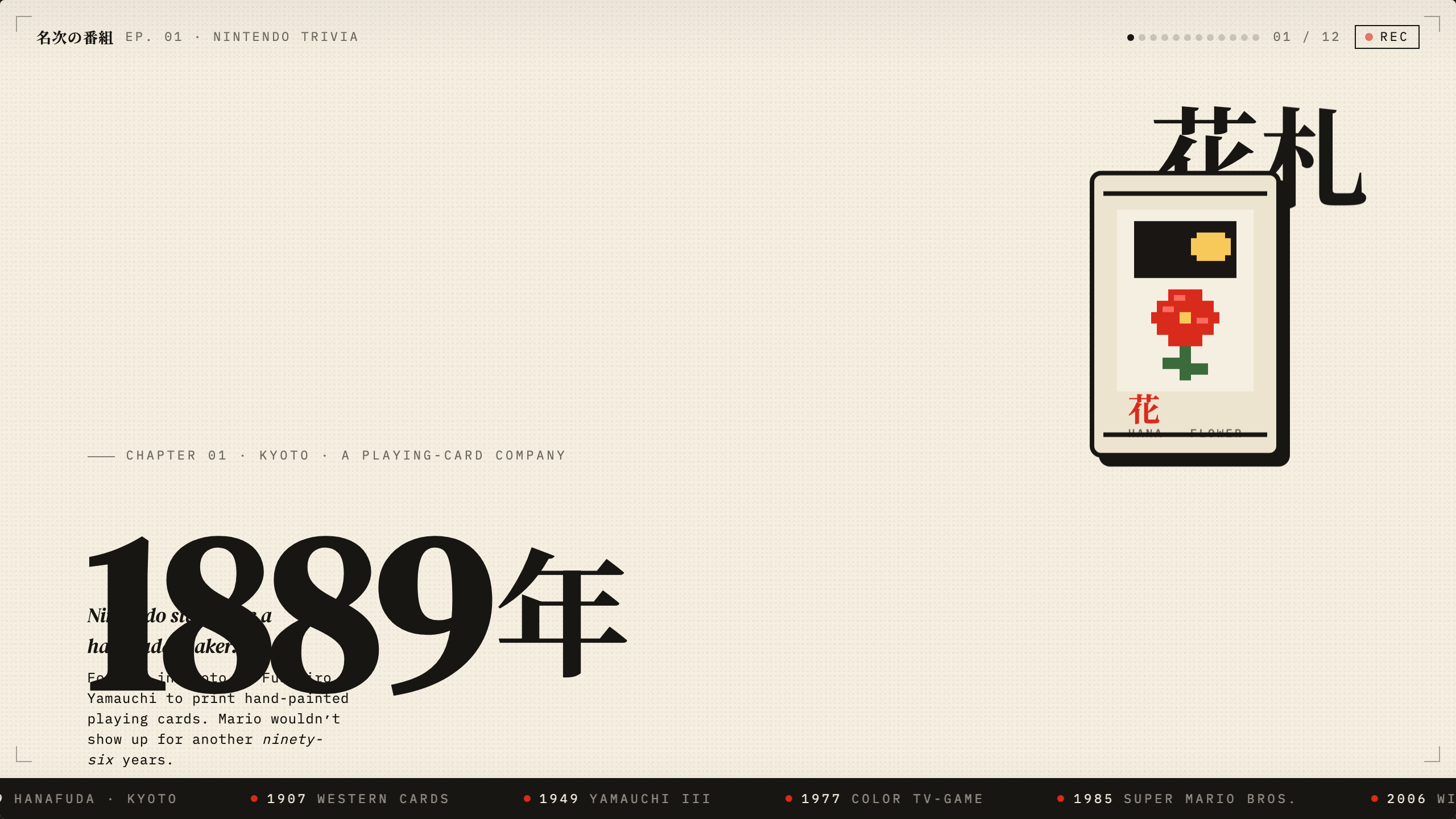
This official OpenDesign example is a Nintendo-inspired editorial poster centered on an oversized 1889 year treatment. It is not a Nintendo product interface: a pixel-art flower playing card, Japanese lettering, a recording-style marker, and an authored timeline share one cream-colored stage. The historical statements are the sample’s editorial content, not independently verified research provided by this Showcase.
The reading order begins with “EP. 01 · NINTENDO TRIVIA,” “01 / 12,” and a recording indicator at the top. The eye then moves toward the card and the large “1889 年” treatment before reaching the explanatory copy: “Nintendo started as a hanafuda maker.” That ordering makes the artifact feel like the opening frame of a serialized visual story, while keeping the origin date as its strongest anchor.
Historical Framing
The “CHAPTER 01 · KYOTO · A PLAYING-CARD COMPANY” line identifies the scene before the body copy supplies context.
Serialized Language
“EP. 01,” “01 / 12,” and “REC” suggest an episodic editorial format, but the supplied artifact does not establish twelve functioning pages or a recording workflow.
Editorial History And Culture Features
The design is suited to cultural explainers, museum-style digital posters, and launch visuals that need to make a founding moment feel immediate. Its strongest use is a short, self-contained story where one object can stand for a larger history.
The copy names Fusajiro Yamauchi, hand-painted playing cards, and the later arrival of Mario. Those details create a deliberate contrast between the company’s stated card-making origin and its familiar modern associations. The design can therefore support a historical introduction without turning the full timeline into a dense chronology.
Opening Frame
Use the top episode label and recording mark when the visual should feel like the first installment of a broader editorial series.
Object-Led Story
Let one illustrated artifact carry the subject while dates and captions provide the surrounding historical frame.
Period Contrast
Pair an 1889 origin statement with later milestone labels to make change visible without adding another panel.
Card, Type, And Timeline Composition
The composition divides attention between a sparse left field and a concentrated right-side object. A cream background with fine repeating dots gives the card and black typography room to read, while red, yellow, and green pixels provide the flower’s small color system. The tradeoff is intentional imbalance: the card becomes memorable, but the oversized title and card compete for the same visual priority.
The card uses a black outer border, a pale inset field, a dark rectangular upper motif, and a block-built red flower. Behind it, large Japanese characters act as both language and shape. In the detail crop, the flower, yellow pixel motif, border, and offset shadow are legible as discrete visual layers. A decorative bottom bar obscures part of the card caption; this is preserved from the original, not evidence of flawless typography.
At the bottom, the ribbon repeats milestone labels such as “1889 HANAFUDA · KYOTO,” “1907 WESTERN CARDS,” “1949 YAMAUCHI III,” “1977 COLOR TV-GAME,” “1985 SUPER MARIO BROS.,” “2006 WII,” and “2017 SWITCH.” Repetition makes the sequence scannable, but it also compresses the historical material into a decorative strip rather than a fully explained chronology.

Anchor The Origin
Place the founding year and chapter label where they can establish the story before secondary milestones enter the reading path.
Build A Layered Sprite
Separate the card frame, flower, motif, shadow, and surrounding lettering so each layer can move or remain still without losing the emblem.
Compress Supporting History
Use a short explanatory paragraph and a repeated bottom ribbon when dates should support the central image rather than become a second article.
Visible Motion And Capability Boundary
The source supplies six running CSS animations: the recording-style dot blinks, the year occasionally glitches, two Japanese characters enter with staggered timing, the card stack bobs, and the repeated milestone ribbon scrolls. This is one HTML/CSS composition with an inline SVG card, not a sprite-sheet player, video editor, connected recording service, or export pipeline.
The complete capture preserves a known overlap where the oversized year crosses the caption area, and the detail crop retains a decorative bar obscuring the card caption. Those are existing clarity defects, not confirmed intentional choices. A new adaptation should adjust scale or placement when uninterrupted reading matters, while keeping the original evidence intact.
How to Create Pixel Sprite Motion Poster Design in OpenDesign
Set The Editorial Frame
Start with one founding moment, one featured object, and a short sequence of later milestones. Keep the top episode marker, chapter line, and origin statement distinct so the viewer can identify the story before reading the detail.
Suggested PromptCreate a cream editorial motion poster about a hanafuda company founded in Kyoto in 1889. Use a sparse stage, a right-aligned pixel flower playing card, oversized Japanese lettering behind it, a large 1889 year marker, a short explanatory paragraph, and a dark bottom timeline with source-provided milestones. Add local CSS-style layer motion only; do not imply live data, video export, or a functioning product.
Refine The Sprite Layers
Separate the card border, pale inset, black motif, red flower, yellow center, green stem, shadow, and Japanese lettering. Check that the sprite remains recognizable at full composition scale and in a close detail crop.
Check Reading Collisions
Compare the title, caption, and explanatory copy at the intended poster size. Preserve the dramatic year overlap only if the text remains understandable; otherwise adjust scale or placement without adding unsupported content.
Export and Get a Share Link
Export your finished design, then use Share in OpenDesign to get a share link. Open the link in a separate browser window and check that the intended version and its assets are available before sending it.

AI Workflow Editorial Poster Design
AI Workflow Editorial Poster Design presents six illustrated workflow claims with numbered chapters, concrete prompt specimens, and cream-and-rust typography.
Graphics
AI Workflow Social Carousel Design
Seven portrait cards use oversized Chinese headings, numbered habits, changing color fields, and a closing statement to explain AI editing workflows.
Graphics
Aurora Field Shader Design
An automatically animated blue-green noise field gives a WebGL hero its atmosphere, while a fixed headline and small local frame-rate badge anchor the scene.
Graphics
Aurora Veil Shader Design
Aurora Veil is an interactive shader composition that turns layered light, stars, and cursor motion into an atmospheric WebGL hero.
Graphics