

Graphics
Software Release Poster Design
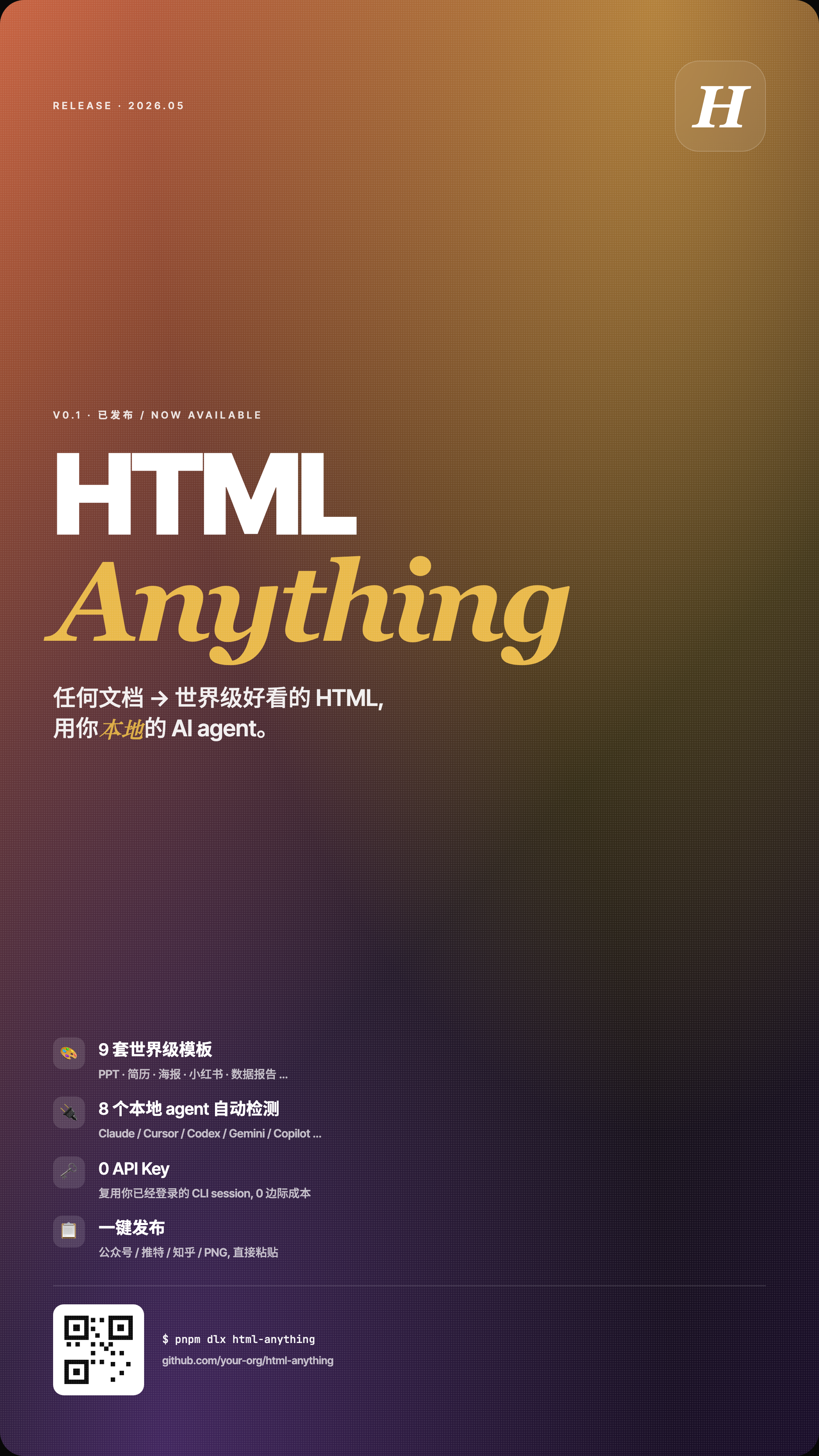
A tall software-release poster pairs oversized white and gold lettering with four feature claims, a warm-to-purple gradient, and technical footer cues.

Release Poster Use Cases
- Product Release AnnouncementsFrame a new release with one dominant visual message.
- Developer Tool PromotionTranslate technical capabilities into a compact poster narrative.
- Mixed-Script Campaign AssetsCombine a Latin product name with Chinese positioning and a bilingual status label.
- Vertical Social PostersAdapt a tall format for poster-style digital publishing.
Product Poster Highlights
- Contrasting Product LetteringWhite block HTML contrasts with gold italic Anything.
- Feature StackPresents four capability claims in a repeated vertical rhythm.
- Command-Line CalloutEnds the story with an installation-style text block.
- Gradient TextureUses color, grain, and oversized type for visual presence.
The Complete Release Poster
1 / 1HTML Anything Release Narrative
This design is a vertical product-release poster for HTML Anything. Its visible reading order starts with the small label “RELEASE · 2026.05”, moves to “V0.1 · 已发布 / NOW AVAILABLE”, and then lands on the oversized “HTML Anything” name. That sequence establishes release context before asking the viewer to process the product message.
The Chinese positioning sentence describes turning documents into attractive HTML through a local AI agent. Its arrow compresses that transformation into one short line, while Latin technical terms connect the sentence to the large product name above. This is mixed-script composition, not two complete language versions. The broad transformation promise remains sample promotional copy and would need substantiation for a real campaign.
This HTML-based graphic is distributed in the OpenDesign Community library with HTMLAnything declared as its upstream source. OpenDesign is identified here as the Community distributor, not as the template’s independent original author. The release date and availability wording are depicted specimens rather than evidence that a campaign was published on that date.
Release Context
The date-like release label and “NOW AVAILABLE” line establish announcement status before the product name appears.
Product Identity
Large white “HTML” and yellow italic “Anything” create a two-part wordmark with strong contrast and editorial emphasis.
Positioning Statement
The Chinese sentence and English term connect document transformation with a local AI-agent concept.
Feature Claims As Poster Copy
The layout can serve a software-release announcement or developer-tool campaign where one image must combine identity, positioning and feature references. Four repeated rows occupy the lower half, each with an icon block, bold title and smaller explanatory line. Their consistent treatment makes the list scannable, but gives each claim similar visual weight; the copy must carry the distinction between inventory, compatibility, setup and distribution.
The first row says “9 套世界级模板” and lists “PPT · 简历 · 海报 · 小红书 · 数据报告 …”. The number is part of the supplied specimen copy, not verified performance evidence. As design, it signals breadth through examples; as campaign content, it would require confirmation and a defined inventory before publication.
The second row claims automatic detection of eight local agents and names Claude, Cursor, Codex, Gemini and Copilot in a slash-separated supporting line. Recognizable names make the general agent reference concrete, while the ellipsis implies additional entries without listing them. This shorthand saves space but does not supply a tested compatibility matrix or demonstrate any detection behavior.
The final two rows shift from capability breadth to operating promises: “0 API Key” with reuse of an already logged-in CLI session, followed by “一键发布” and destinations including 公众号, 推特, 知乎, and PNG. These lines give the poster a practical ending, yet the image only proves that the claims are displayed; it does not establish live integrations, authentication behavior, or successful publishing.
Breadth Claim
Template examples make the first row legible as a range of output formats, while the displayed count remains illustrative.
Tooling Claim
Named agents turn a general automation message into recognizable ecosystem references without defining runtime support.
Workflow Claim
API-key and publishing lines suggest reduced setup and distribution steps, but the poster does not demonstrate those behaviors.
Vertical Composition And Reading Order
The source CSS defines the poster at 1080 pixels wide with a 9:16 aspect ratio and a maximum width of 96vw. That proportion gives the design a tall, mobile-oriented canvas. The generous empty field between the hero statement and feature stack slows the transition from brand recognition to detail, preserving emphasis on the product name.
A warm orange-red and ochre upper field transitions into purple-black below, with a fine dotted texture across the surface. The hero uses large white and gold lettering, while the feature rows rely on smaller white headings and muted supporting lines. The darker lower field gives those rows a distinct visual setting; the muted text still needs sufficient size and contrast when the poster is displayed smaller.
An italic “H” inside a translucent rounded square balances the release label at the top. At the bottom, a QR-like SVG sits beside the plain text “$ pnpm dlx html-anything” and “github.com/your-org/html-anything”. The SVG is drawn from rectangles without a supplied encoded destination, and the your-org URL is a placeholder. These are technical visual cues, not verified installation instructions, executable controls or working links.
Start With Status
The release label and “V0.1 · 已发布 / NOW AVAILABLE” establish when and why the viewer should pay attention.
Scale The Name
The oversized HTML Anything lockup dominates the central field, making product recognition possible before the feature copy is read.
Stack Feature Claims
Four icon-led rows move from templates to agents, then setup and publishing references; the layout organizes claims rather than proving them.
End With Technical Cues
Plain command text, a placeholder repository address and a decorative QR-like block end the composition without implementing a button or verified destination.
Visible Design And Capability Boundary
This static HTML demonstrates typography, mixed-script copy, gradients, grain and four feature rows on a 9:16 canvas. Its command line is plain text, the repository address is a your-org placeholder, and the QR-like SVG supplies no verified encoded destination. It does not establish working agent detection, authenticated CLI reuse, zero marginal cost, live publishing, or the template inventory and release status asserted by the sample copy.
OpenDesign distributes the template through Community, while HTMLAnything is its declared upstream. The bundled plugin manifest declares MIT, but that does not establish separate licensing for every depicted asset. An adaptation should preserve the distinction between distribution and original authorship and check replacement campaign copy, names, destinations and asset rights.
Adaptation Boundary
A recreation can retain the hierarchy and visual technique while replacing the sample release label, counts, compatibility list, cost claims and publishing destinations with verified project information. If a real command, repository URL or QR destination is added, test it separately and distinguish it from the original poster’s decorative technical cues.
How to Create Software Release Poster Design in OpenDesign
Set The Poster Frame
Create a fixed vertical canvas using the source proportion: 1080 pixels wide with a 9:16 aspect ratio and a maximum width near 96vw. Keep the release label at the upper left and a compact mark at the upper right so the first scan establishes status and identity.
Build The Product-Name Hero
Use a small bilingual availability label, a large two-part product name, and a short Chinese positioning statement containing Latin technical terms. Preserve the white block lettering and gold italic lettering, then check that the supporting sentence remains readable without competing with the product name. This is mixed-script copy, not parallel full English and Chinese versions.
Suggested PromptCreate a static 9:16 software-release poster with a warm orange and ochre upper field transitioning to dark purple below, fine dotted grain, and a small italic H in a translucent rounded square at upper right. Use illustrative release and availability labels, oversized white HTML above gold italic Anything, and a short Chinese positioning sentence with Latin technical terms. Arrange four icon-led feature rows for templates, agent references, setup and publishing claims. Finish with plain command-style text, a clearly labeled repository placeholder and a decorative QR-like SVG. Treat release dates, counts, compatibility, cost and publishing promises as unverified sample copy; do not implement or claim agent detection, authenticated session reuse, a working QR destination, or real publishing.
Refine The Feature Stack
Arrange four repeated rows in the observed order: template breadth, local agents, API-key positioning, and publishing destinations. Give each row an icon block, bold title, and supporting line, but verify every number, named tool, destination, and ellipsis before using the poster for a real release.
Check The Technical Ending
Finish with a command-line line, repository-style link, and QR treatment only when the destination is confirmed. Check the transition from the warm upper gradient to the dark lower field, preserve the dotted texture at readable scale, and confirm that the smallest supporting text remains legible.
Export and Get a Share Link
Export your finished design, then use Share in OpenDesign to get a share link. Open the link in a separate browser window and check that the intended version and its assets are available before sending it.

AI Workflow Editorial Poster Design
AI Workflow Editorial Poster Design presents six illustrated workflow claims with numbered chapters, concrete prompt specimens, and cream-and-rust typography.
Graphics
AI Workflow Social Carousel Design
Seven portrait cards use oversized Chinese headings, numbered habits, changing color fields, and a closing statement to explain AI editing workflows.
Graphics
Aurora Field Shader Design
An automatically animated blue-green noise field gives a WebGL hero its atmosphere, while a fixed headline and small local frame-rate badge anchor the scene.
Graphics
Aurora Veil Shader Design
Aurora Veil is an interactive shader composition that turns layered light, stars, and cursor motion into an atmospheric WebGL hero.
Graphics