

Graphics
Quarterly Financial Report Design
Quarterly Financial Report Design turns illustrative finance data into a single-page narrative that connects headline KPIs, comparisons, accounts, and outlook.

Quarterly Report Use Cases
- Financial Reporting TeamsOrganize quarterly performance evidence into a concise executive document.
- Finance LeadershipScan revenue, costs, profitability, accounts, and forward-looking context together.
- Business Review DesignersBuild report pages that connect summary metrics to supporting detail.
Quarterly Report Highlights
- Headline KPIsFour prominent metrics establish the report's opening financial snapshot.
- Comparative P&LQuarterly and yearly columns frame each line item's movement.
- Account ContextCustomer, plan, region, ARR, and status share one table.
- Q4 OutlookA quotation and forecast close the page with forward context.
The Quarterly Financial Report
1 / 1Quarterly Financial Report Design
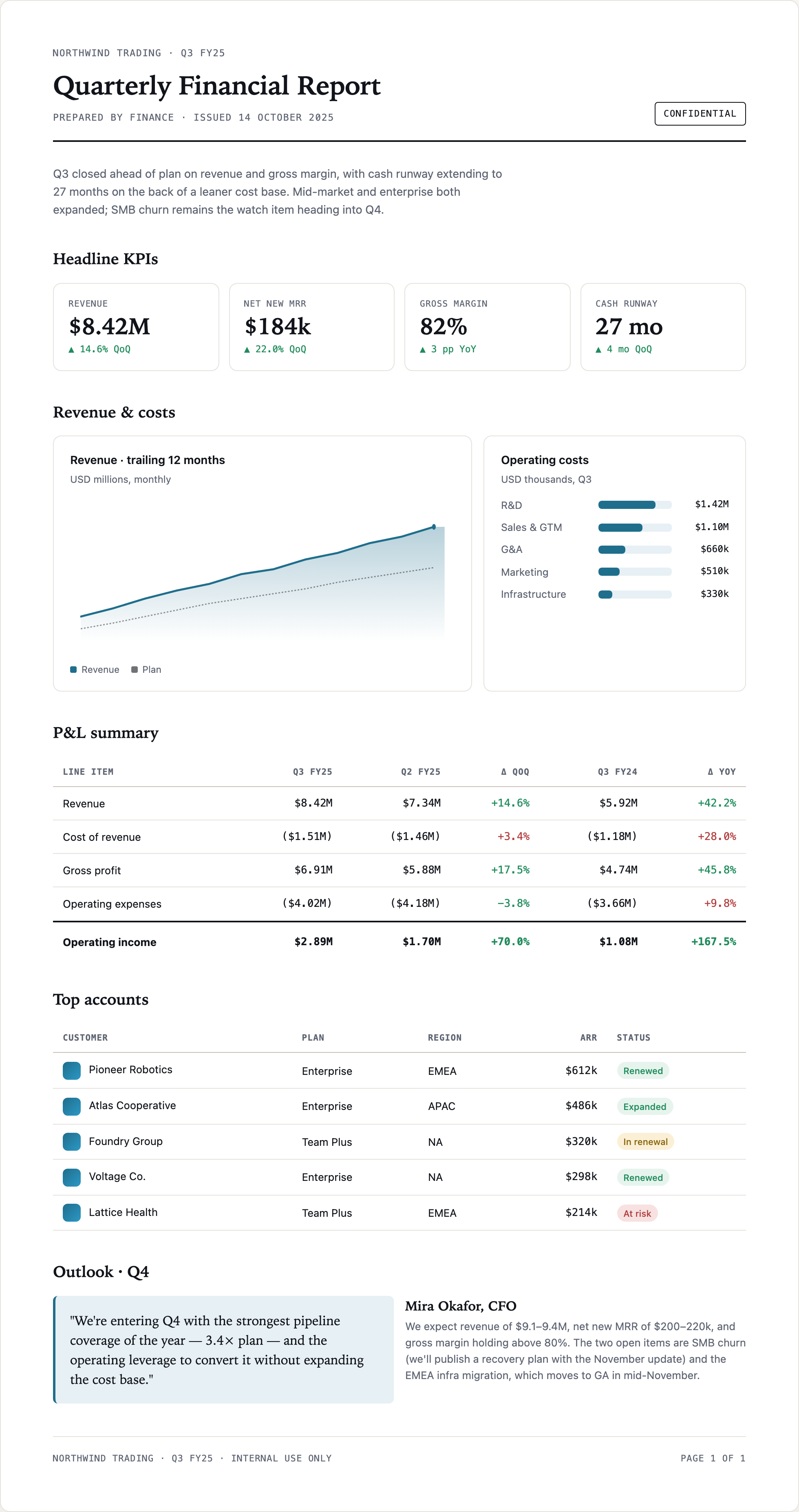
This official OpenDesign example presents a one-page Northwind Trading report for Q3 FY25. Its structure moves from a short narrative introduction to headline KPIs, revenue and cost evidence, a P&L table, top accounts, and an Outlook · Q4 close. That ordering gives a reader an executive summary first, then progressively more specific evidence.
The visual composition is deliberately document-like: a wide white page, a strong horizontal rule below the issue information, serif section headings, compact uppercase metadata, and restrained blue, green, red, and amber accents. The supplied CSS sets the page maximum width to 980px, which supports a readable report canvas while leaving enough room for the two-column revenue and costs area.
The opening paragraph states that Q3 closed ahead of plan and identifies SMB churn as a watch item. Because it appears before the metrics, it frames how the figures should be read. The design therefore treats narrative as an orientation layer rather than leaving interpretation to the tables alone.
Summary Before Detail
The four KPI cards establish the main signals before the reader reaches charts or tables.
Evidence In Context
Revenue, cost, and P&L views let the reader compare related figures without leaving the page.
Close With Direction
The Q4 section separates a quoted point of view from the supporting forecast paragraph.
Executive Review And Finance Communication
The design suits a quarterly review where a reader needs both a fast scan and enough detail to check the story. The KPI row shows Revenue at $8.42M, Net New MRR at $184k, Gross Margin at 82%, and Cash Runway at 27 mo. Each value is paired with a directional comparison, such as 14.6% QoQ or 3 pp YoY, so the number and its reference period remain together.
The page can support an executive document, a board-preparation artifact, or an internal finance update when the underlying content is verified separately. Its single-page structure is especially useful when the report must be read in sequence rather than explored as a collection of independent dashboard views.
The figures and named accounts are supplied illustrative report content. They should be replaced or validated before use, and the page should not be treated as financial advice or as evidence of live operating performance.
| Report Area | Visible Evidence | Reader Task |
|---|---|---|
| Headline KPIs | Four values with period comparisons | Establish the primary signals |
| Revenue & costs | Trailing revenue chart and cost bars | Relate trend and cost allocation |
| P&L summary | Q3, Q2, YoY, and variance columns | Compare profitability line by line |
| Top accounts | Plan, region, ARR, and status | Locate customer-level context |
A Scan Path For Different Reading Speeds
A quick reader can stop after the introductory paragraph and KPI cards. A closer reader can follow the Revenue · trailing 12 months chart, inspect Operating costs, compare the P&L summary columns, and then use Top accounts to connect financial context with customer status.
This layered path is a practical tradeoff. More sections fit on one page, but the density means each section must retain a distinct job. The report avoids adding extra navigation or separate dashboard states, so the reader benefits from continuity but cannot filter the visible sample in place.
From Headline KPIs To Q4 Outlook
The page's main compositional choice is a vertical narrative with a wide central column and selective two-column groupings. The four KPI cards create a repeated rhythm across the page. Below them, Revenue · trailing 12 months receives the larger area while Operating costs occupies a narrower companion panel. This proportion gives the trend more visual space without removing the cost breakdown.
The left panel says “USD millions, monthly” and distinguishes Revenue from Plan, but its hard-coded SVG has no month labels or numeric ticks. It illustrates direction rather than a checkable monthly series. The cost panel says “USD thousands, Q3” while individual labels mix $1.42M and $1.10M with $660k, $510k, and $330k. Those five amounts total $4.02M, matching operating expenses in the P&L table; a reused report should make the mixed unit convention explicit.
The P&L summary then changes from graphical comparison to a structured table. Its columns are Line item, Q3 FY25, Q2 FY25, Δ QoQ, Q3 FY24, and Δ YoY. Parentheses distinguish costs from positive amounts, while green and red variance text adds a visual judgment layer. That color treatment speeds scanning, but the meaning of positive cost movement still requires the row label and accounting convention.
Table Detail Carries The Argument
The supplied rows show Revenue at $8.42M against $7.34M in Q2 FY25 and $5.92M in Q3 FY24, followed by Gross profit at $6.91M and Operating income at $2.89M. The table's ordering lets a reader trace the report from top-line result through costs and profitability instead of viewing each figure as an isolated KPI.
The final Operating income row is visually emphasized with a heavier divider and bold values. That treatment tells the reader where the table's progression culminates. It also creates a hierarchy that could overemphasize the final row if the report's editorial priorities change, so any adaptation should preserve emphasis only when the underlying narrative supports it.
Accounts Add A Different Kind Of Evidence
Top accounts uses five fields: Customer, Plan, Region, ARR, and Status. The sample rows pair named organizations such as Pioneer Robotics and Atlas Cooperative with statuses including Renewed, Expanded, In renewal, and At risk. Rounded status labels provide fast scanning, while the adjacent ARR values retain financial specificity.
This section is not another performance chart. It gives the financial narrative an account-level reference point and introduces operational states that the P&L table cannot show. The tradeoff is confidentiality and maintenance: customer names, ARR, and status require careful validation before publication.
Design Boundary
This artifact is a visual report example with supplied sample content. The capture demonstrates layout, typography, color, charts, tables, and state labels as rendered design elements; it does not establish a connected data source, live calculations, storage, or a production reporting workflow. The financial results, clients, and Q4 outlook are illustrative and must not be used to make financial recommendations.
How to Create Quarterly Financial Report Design in OpenDesign
Set The Report Narrative
Start with a one-page quarterly sequence: introductory performance statement, Headline KPIs, Revenue & costs, P&L summary, Top accounts, and Outlook · Q4. Keep each section tied to the reader's next question rather than adding unrelated panels.
Suggested PromptCreate a single-page Quarterly Financial Report Design for Northwind Trading Q3 FY25 with a headline narrative, four KPI cards for Revenue, Net New MRR, Gross Margin, and Cash Runway, a trailing-12-month revenue chart, a Q3 operating-cost breakdown, a comparative P&L table, a Top accounts table, and a Q4 Outlook. Use illustrative data only, show units and comparison periods, and do not imply live services or financial advice.
Refine The Comparison Structure
Check that every KPI keeps its comparison label, that the revenue chart distinguishes Revenue from Plan, and that the P&L table preserves Q3, Q2, and prior-year columns. Keep costs in parentheses and make variance color support the labels rather than replace them.
Check The Closing Context
Review the Top accounts fields and the Outlook · Q4 arrangement together. Preserve the distinction between customer status, ARR, quoted commentary, and forecast text. Validate all names, figures, units, and confidentiality language before adapting the report for real use.
Export and Get a Share Link
Export your finished design, then use Share in OpenDesign to get a share link. Open the link in a separate browser window and check that the intended version and its assets are available before sending it.

AI Workflow Editorial Poster Design
AI Workflow Editorial Poster Design presents six illustrated workflow claims with numbered chapters, concrete prompt specimens, and cream-and-rust typography.
Graphics
AI Workflow Social Carousel Design
Seven portrait cards use oversized Chinese headings, numbered habits, changing color fields, and a closing statement to explain AI editing workflows.
Graphics
Aurora Field Shader Design
An automatically animated blue-green noise field gives a WebGL hero its atmosphere, while a fixed headline and small local frame-rate badge anchor the scene.
Graphics
Aurora Veil Shader Design
Aurora Veil is an interactive shader composition that turns layered light, stars, and cursor motion into an atmospheric WebGL hero.
Graphics