

Desktop app
Code Review Inbox App Design
Code Review Inbox App Design brings review requests, CI failures, assigned issues, and activity into one scan-ready workspace for daily triage.

Code Review Inbox App Use Cases
- Review Request TriageFind approvals, open pull requests, and pending replies in one queue.
- CI Failure MonitoringSurface failed checks alongside the commit context needed for follow-up.
- Issue PrioritizationScan assigned work with repository, status, labels, and recent activity.
- Engineering Activity ReviewKeep merged changes visible without mixing them into urgent work.
Review Inbox Design Highlights
- Priority FirstYellow review panels place work waiting on you at the top.
- Evidence In ContextA compact code diff sits inside its review request.
- State-Based ColorGreen, red, yellow, and purple distinguish workflow states.
- Single WorkspaceRequests, checks, issues, and activity share one reading flow.
The Code Review Inbox, Panel by Panel
1 / 2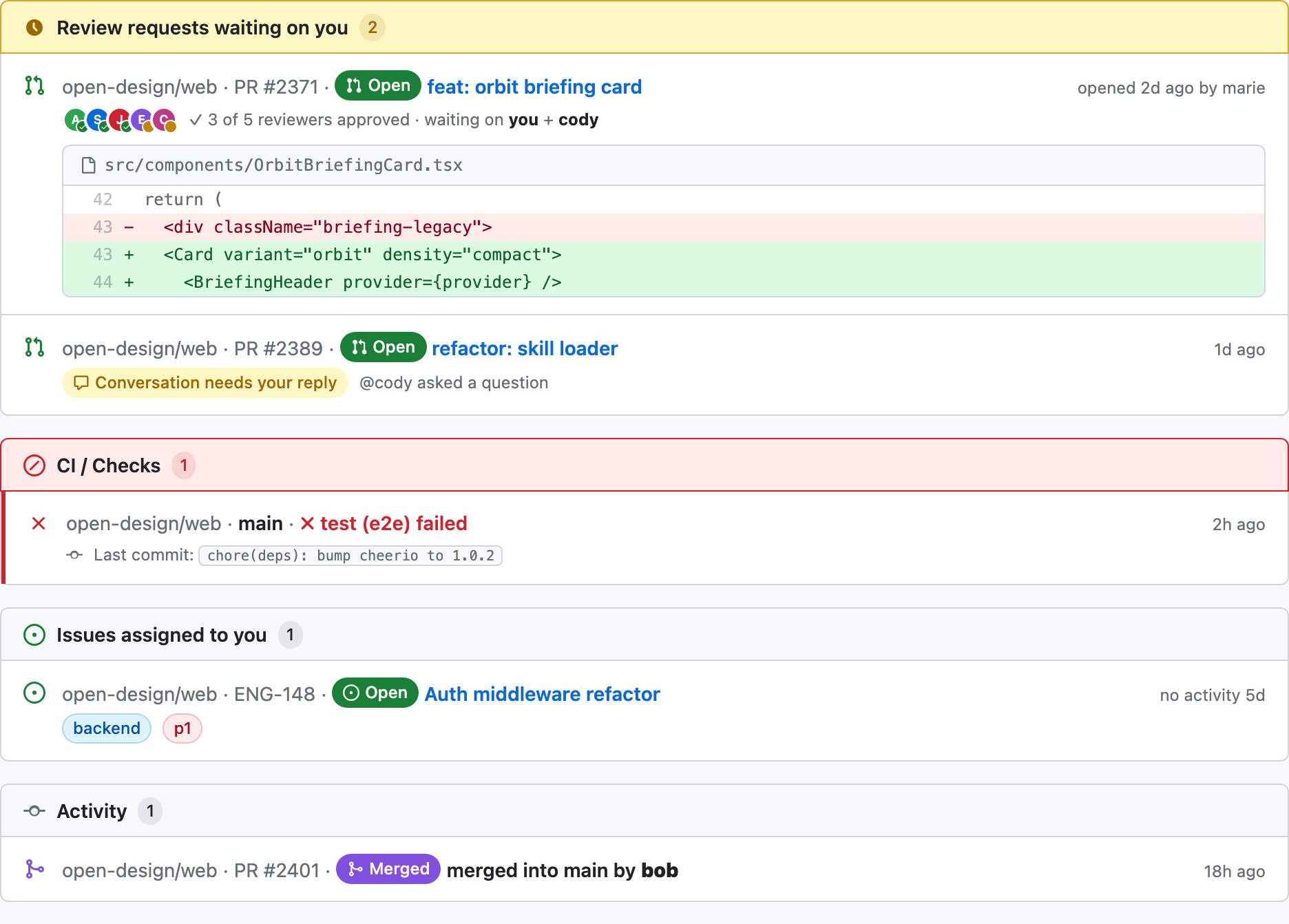
Code Review Inbox Structure
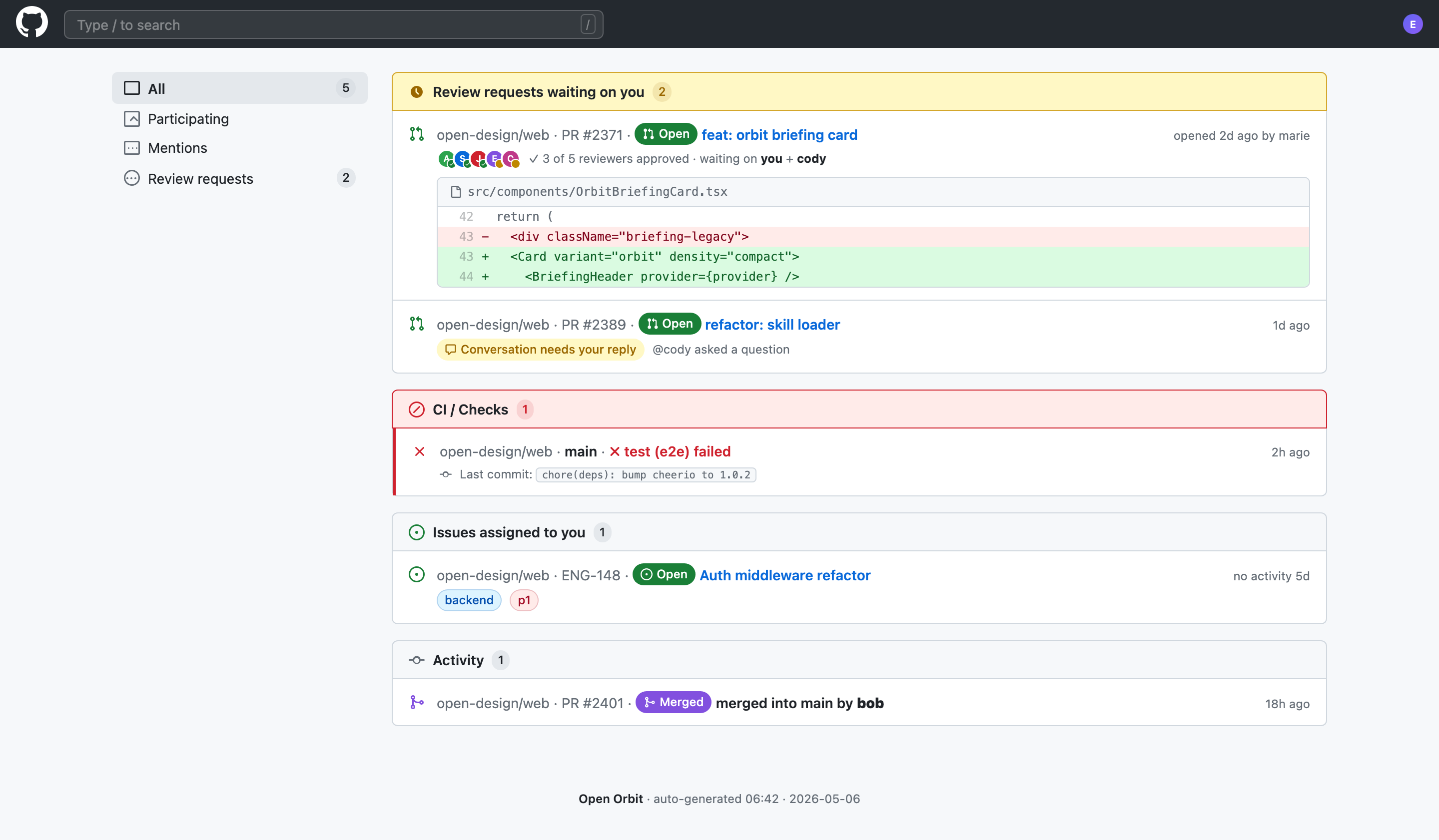
This desktop-app design presents a GitHub review-request and mention inbox as a vertically ordered workspace. A left rail begins with “All 5,” followed by “Participating,” “Mentions,” and “Review requests 2.” The main column then groups work into review requests, CI checks, assigned issues, and activity. That sequence turns several engineering signals into one scan path, while the separate categories preserve enough context to decide what needs attention first.
A Review Request As Evidence
The first review item identifies open-design/web PR #2371, names “feat: orbit briefing card,” and shows “3 of 5 reviewers approved · waiting on you + cody.” Beneath it, the file path “src/components/OrbitBriefingCard.tsx” introduces a compact diff with removed and added lines. This pairing lets a reviewer connect the approval state to a concrete change. The tradeoff is vertical density: the code excerpt adds useful context, but it makes the first item substantially taller than the second request.
Engineering Triage Use Cases
The design supports several distinct tasks without pretending that they are the same kind of work. Review requests ask for a response or approval, CI checks signal a failed verification state, assigned issues represent owned backlog work, and activity records a completed change. Keeping these groups as separate panels makes the task boundary visible. The tradeoff is that related signals remain distributed across the page rather than being condensed into one universal score.
Pending Review
The yellow “Review requests waiting on you” header carries a count of 2. Its first row is an open pull request with reviewer avatars and an explicit waiting state, while the second row says “Conversation needs your reply” and identifies @cody. The labels distinguish approval work from conversation work even though both require action.
Failed Verification
The red “CI / Checks” panel contains one item: open-design/web · main · “test (e2e) failed.” The nearby last-commit text, “chore(deps): bump cheerio to 1.0.2,” supplies a likely investigation anchor without claiming why the test failed. Red emphasis makes the state prominent, but it does not explain remediation.
Owned And Completed Work
The issue row combines “Auth middleware refactor” with Open status, the “backend” label, and “p1.” Below it, the activity row shows PR #2401 as merged into main by bob. This ordering keeps unresolved ownership above completed history, although the page still requires the reader to interpret urgency from labels and state.
Workspace Reading Flow
The workspace uses a wide main column and a compact navigation rail rather than equal-sized dashboard tiles. The shipped CSS sets a 1280px maximum page width, and the visible layout gives the event panels most of the horizontal space. This proportion supports long repository names, pull-request titles, timestamps, and code lines without forcing each item into a separate card column. The cost is a long vertical scan, especially when the review request includes its embedded diff.
Review Panel
A yellow header, count badge, open-status pills, reviewer avatars, and a code diff combine urgency with evidence.
CI Panel
A red header and failed check row isolate verification trouble from review and ownership work.
Issue Panel
Status and labels expose the assigned item’s workflow state and category in a short row.
Activity Panel
Purple merged styling identifies completed history without competing with unresolved items above it.
From Filter To Detail
The top search field reads Type / to search, but has no search handler. The sidebar filters do work on the supplied local groups: Participating shows review requests and assigned issues, Review requests shows the review group, and Mentions shows only the group carrying the source's mention marker. That marker is attached to assigned issues rather than the reply-needed review row. The filtering is local presentation behavior, not a connected GitHub search or inbox service.
State Changes Through Color
Color carries state across otherwise similar rows. Green marks open or healthy-looking repository states, yellow marks work waiting for a response, red marks the failed test, and purple marks the merged activity item. The issue labels use separate blue and pink pills for “backend” and “p1.” This makes scanning faster than reading every sentence, but color remains supplemental: each state is also written as text, which preserves meaning when color alone is insufficient.
Capability Boundary
The source implements local category filtering and constructs outbound GitHub links for rows and titles. Those links point to a fixed repository using the displayed sample identifiers; their existence does not verify the depicted pull requests, issues, or CI results. Search, authenticated inbox retrieval, persistent review state, and real test execution are not implemented. Names, counts, timestamps, approval states, and code excerpts remain illustrative content for the design scenario.
How to Create Code Review Inbox App Design in OpenDesign
Set The Workspace Order
Create a desktop workspace with a persistent left rail for “All,” “Participating,” “Mentions,” and “Review requests,” followed by a wide main column. Put review requests first, then CI checks, assigned issues, and activity so unresolved work precedes history.
Add The Case-Specific States
Use sample rows for PR #2371 and PR #2389, a failed “test (e2e)” check on main, the ENG-148 assigned issue, and the merged PR #2401 activity item. Preserve explicit labels such as “waiting on you,” “Conversation needs your reply,” “backend,” and “p1.”
Suggested PromptCreate a desktop Code Review Inbox App Design with a persistent left filter rail and a wide grouped workspace. Show review requests first, including PR #2371 with a compact OrbitBriefingCard.tsx diff and PR #2389 with a reply-needed state; then show CI / Checks with a failed test (e2e), Issues assigned to you with ENG-148, and Activity with merged PR #2401. Use illustrative local data only and do not imply a live GitHub connection, backend, storage, or real test execution.
Refine The Scan Pattern
Check that yellow review emphasis, red CI failure treatment, green open states, and purple merged activity remain readable with written labels. Keep the code excerpt subordinate to its review row, preserve the long repository and file names, and verify that the vertical grouping still reads correctly when the workspace narrows.
Export and Get a Share Link
Export your finished design, then use Share in OpenDesign to get a share link. Open the link in a separate browser window and check that the intended version and its assets are available before sending it.
Analytics Dashboard Wireframe Design
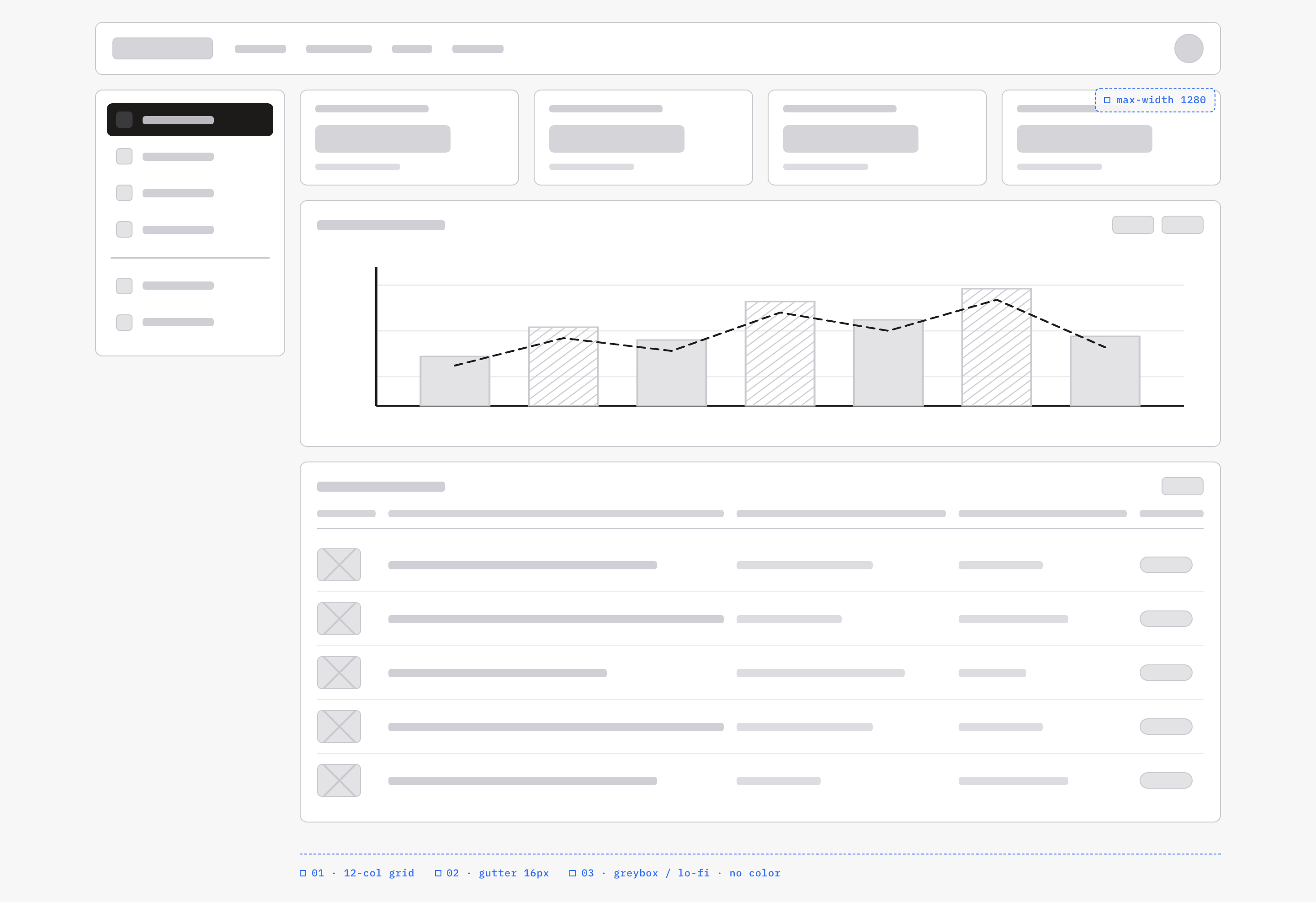
An OpenDesign greybox dashboard maps an analytics workspace through a sidebar, four KPI placeholders, a schematic chart, five table rows and blue layout annotations.
Desktop app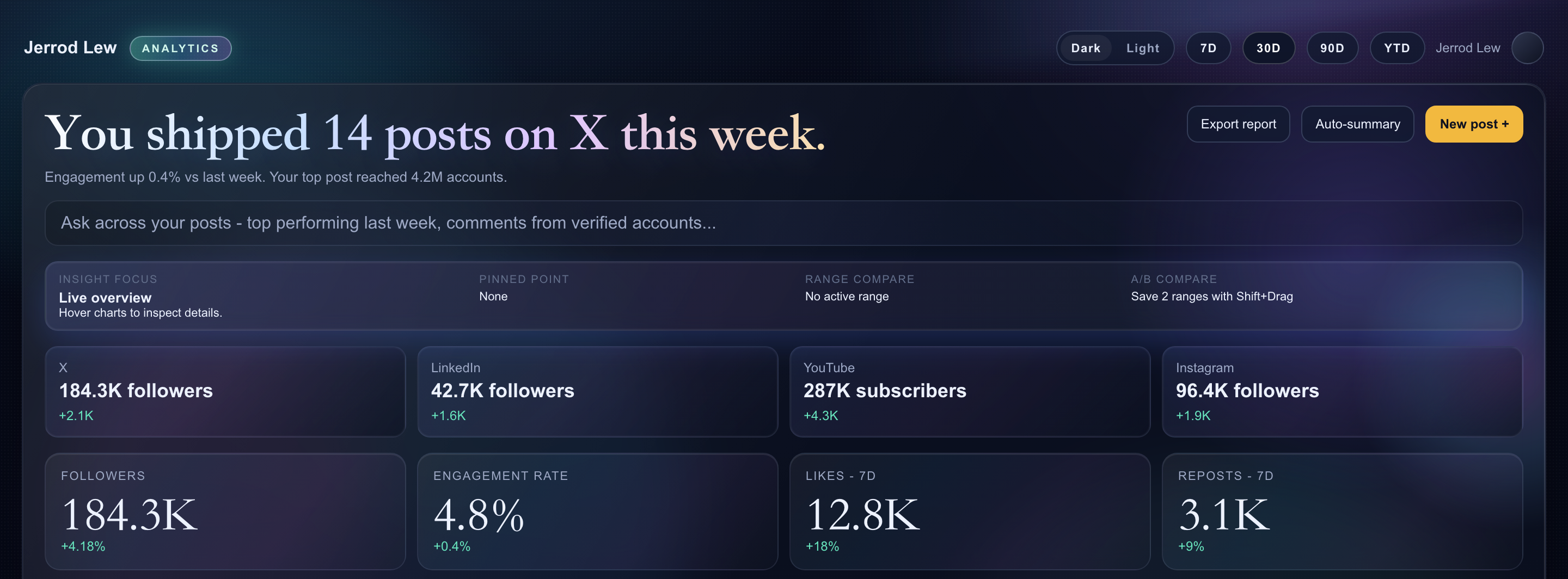
Content Performance Dashboard Design
A dark content dashboard connects platform snapshots with chart inspection, draft planning and a deeper view of audience and conversion signals.
Desktop app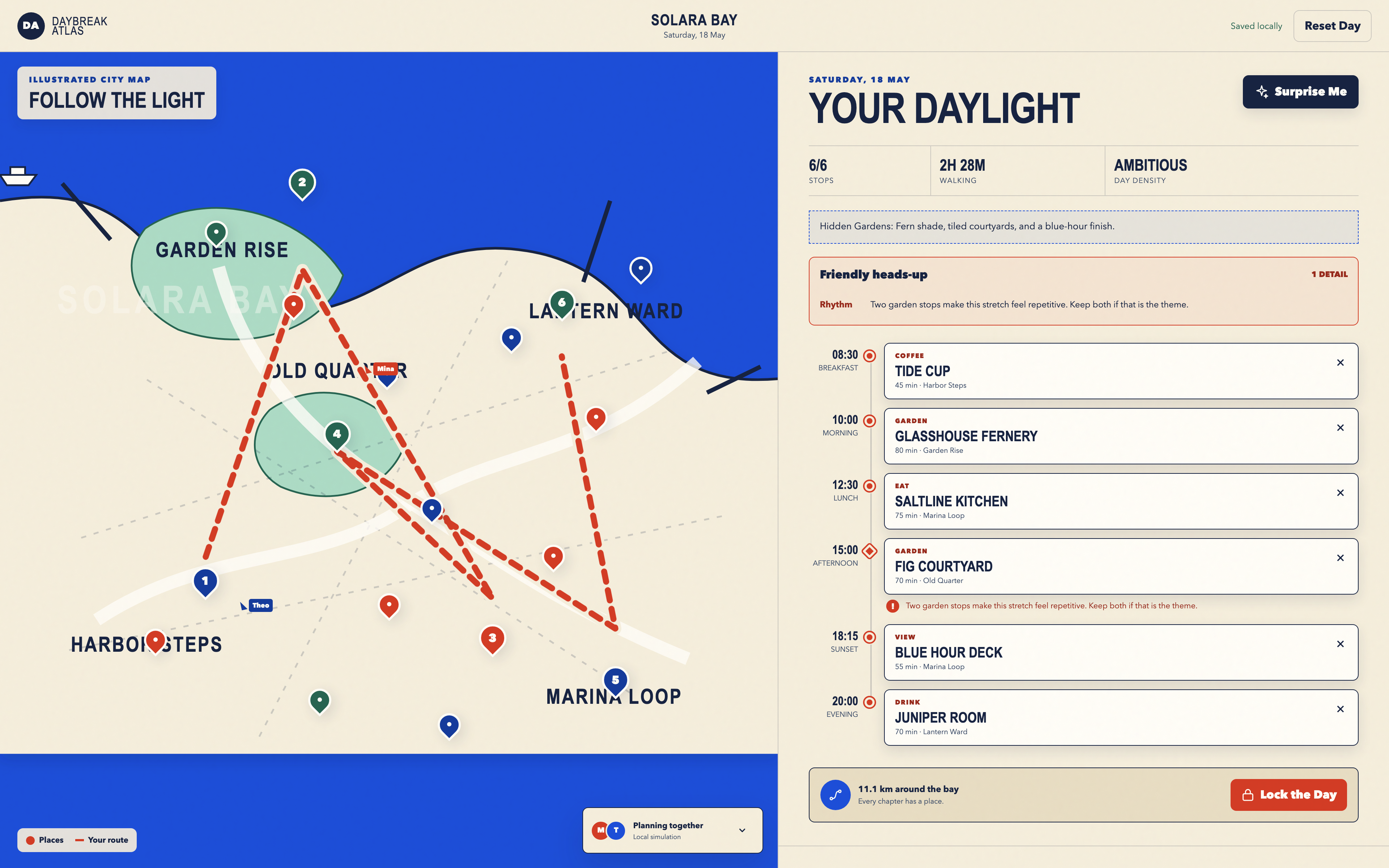
Day Trip Planner Design
Plan six timed stops in fictional Solara Bay, with an illustrated map, walking estimates and useful route warnings.
Desktop app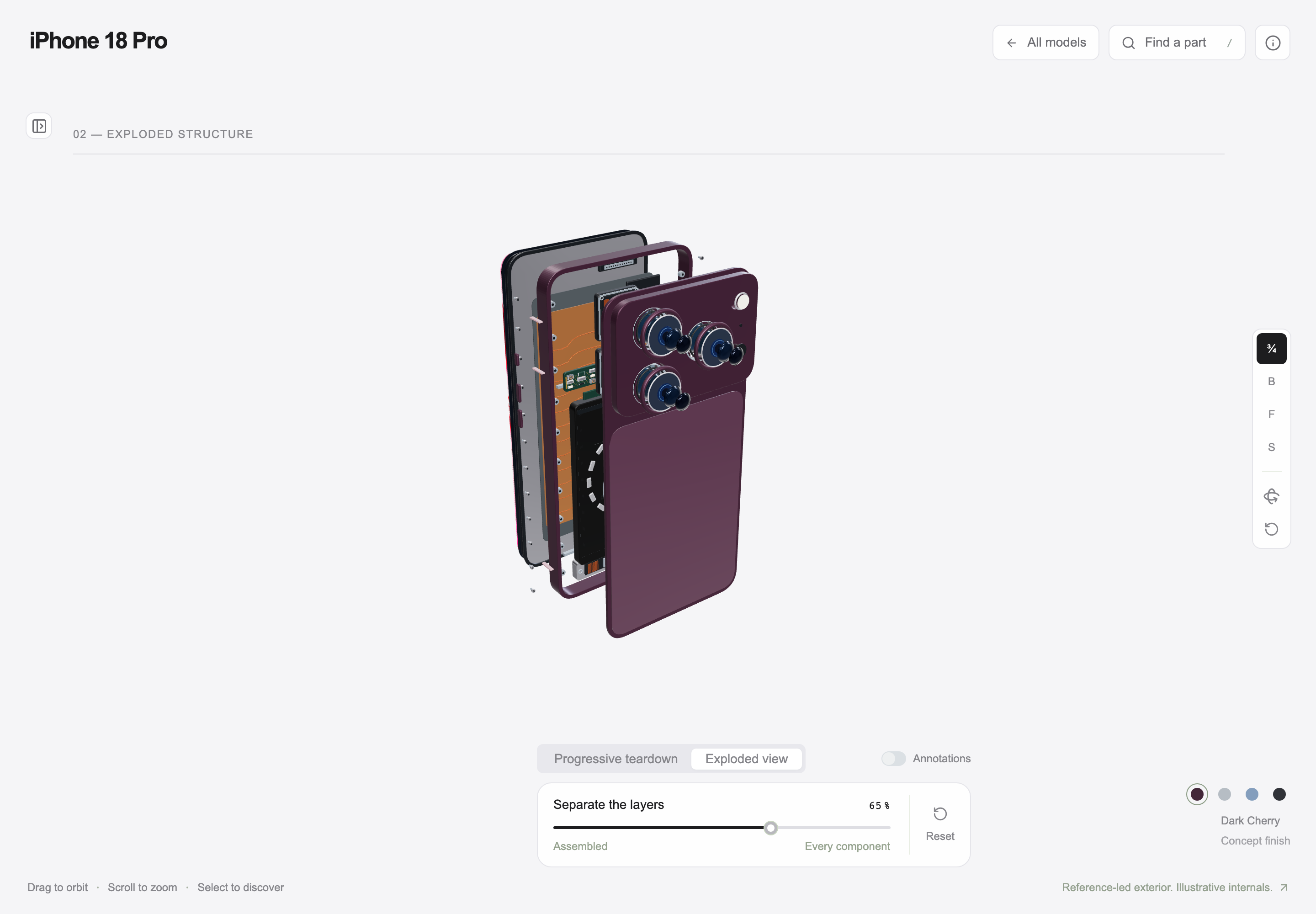
Interactive Product Explainer Design
Explore a concept phone’s separated layers with camera presets, a slider and a panel of eight assembly groups.
Desktop app